<p>I published “How to Quit Using the Annoying Windows 11 Context Menu🍔”<br><a href="https://www.ii.com/use-win10-context-menu/" rel="nofollow" class="ellipsis" title="www.ii.com/use-win10-context-menu/"><span class="invisible">https://</span><span class="ellipsis">www.ii.com/use-win10-context-m</span><span class="invisible">enu/</span></a><br><a href="/tags/cli/" rel="tag">#CLI</a> <a href="/tags/productivity/" rel="tag">#Productivity</a> <a href="/tags/gtd/" rel="tag">#GTD</a> <a href="/tags/windows/" rel="tag">#Windows</a> <a href="/tags/registry/" rel="tag">#Registry</a> <a href="/tags/registryeditor/" rel="tag">#RegistryEditor</a> <a href="/tags/sysadmin/" rel="tag">#SysAdmin</a> <a href="/tags/annoyance/" rel="tag">#Annoyance</a> <a href="/tags/annoyances/" rel="tag">#Annoyances</a> <a href="/tags/powershell/" rel="tag">#PowerShell</a> <a href="/tags/regedit/" rel="tag">#regedit</a> <a href="/tags/windows10/" rel="tag">#Windows10</a> <a href="/tags/win10/" rel="tag">#Win10</a> <a href="/tags/windows11/" rel="tag">#Windows11</a> <a href="/tags/win11/" rel="tag">#Win11</a> <a href="/tags/infiniteink/" rel="tag">#InfiniteInk</a> <a href="/tags/byℵ/" rel="tag">#Byℵ</a> <a href="/tags/bynm/" rel="tag">#ByNM</a></p>
cli
<p>I published “6+ Ways to Quit Using the Annoying Windows 11 Context Menu🍔”<br><a href="https://www.ii.com/6plus-ways-to-use-win10-context-menu-in-win11/" rel="nofollow" class="ellipsis" title="www.ii.com/6plus-ways-to-use-win10-context-menu-in-win11/"><span class="invisible">https://</span><span class="ellipsis">www.ii.com/6plus-ways-to-use-w</span><span class="invisible">in10-context-menu-in-win11/</span></a><br><a href="/tags/productivity/" rel="tag">#Productivity</a> <a href="/tags/windows/" rel="tag">#Windows</a> <a href="/tags/debloat/" rel="tag">#Debloat</a> <a href="/tags/tweak/" rel="tag">#Tweak</a> <a href="/tags/registry/" rel="tag">#Registry</a> <a href="/tags/sysadmin/" rel="tag">#SysAdmin</a> <a href="/tags/cli/" rel="tag">#CLI</a> <a href="/tags/annoyance/" rel="tag">#Annoyance</a> <a href="/tags/annoyances/" rel="tag">#Annoyances</a> <a href="/tags/powershell/" rel="tag">#PowerShell</a> <a href="/tags/windows11/" rel="tag">#Windows11</a> <a href="/tags/win11/" rel="tag">#Win11</a> <a href="/tags/win11sucks/" rel="tag">#Win11Sucks</a> <a href="/tags/infiniteink/" rel="tag">#InfiniteInk</a> <a href="/tags/byℵ/" rel="tag">#Byℵ</a> <a href="/tags/bynm/" rel="tag">#ByNM</a></p>
Edited 54d ago

<p>Here's a very brief tip for the more techy people on here:</p><p>You can use Mastodon (and compatible servers) through command lines and text-based interfaces with the free open source client "toot":</p><p>➡️ <a href="https://toot.bezdomni.net" rel="nofollow"><span class="invisible">https://</span>toot.bezdomni.net</a></p><p>There are lots more details on the developer's website.</p><p><a href="/tags/cli/" rel="tag">#CLI</a> <a href="/tags/tui/" rel="tag">#TUI</a> <a href="/tags/mastodon/" rel="tag">#Mastodon</a></p>
<p>🎉 Big thanks to <span class="h-card"><a href="https://hackers.pub/@2chanhaeng" class="u-url mention" rel="nofollow noopener noreferrer" target="_blank">@<span>2chanhaeng</span></a></span> for his first contribution to <a href="/tags/fedify/" rel="tag">#Fedify</a>! He implemented the new <a href="https://unstable.fedify.dev/cli#fedify-webfinger-looking-up-a-webfinger-resource" rel="nofollow">fedify webfinger</a> command in <a href="https://github.com/fedify-dev/fedify/pull/278" rel="nofollow">PR #278</a>, which allows isolated <a href="/tags/webfinger/" rel="tag">#WebFinger</a> lookups for testing configurations. This addresses the need for developers to test WebFinger functionality without performing comprehensive object retrieval.</p><p>The contribution includes:</p><p>A new fedify webfinger <handle> command that accepts @user@domain format handles or URIs<br>Clean JSON output of WebFinger JRD results<br>Proper error handling for invalid handles and lookup failures<br>Complete <a href="/tags/cli/" rel="tag">#CLI</a> integration with help text and usage examples</p><p>This was originally filed as <a href="https://github.com/fedify-dev/fedify/issues/260" rel="nofollow">issue #260</a> and marked as a <a href="https://github.com/fedify-dev/fedify/issues?q=sort%3Aupdated-desc+state%3Aopen+label%3A%22good+first+issue%22" rel="nofollow">good first issue</a>—perfect for newcomers to learn the codebase structure while contributing meaningful functionality. The PR has been merged and will be included in the upcoming Fedify 1.8.0 release.</p><p>We appreciate all first-time contributors who help make Fedify better for the entire <a href="/tags/fediverse/" rel="tag">#fediverse</a> community. Welcome aboard, ChanHaeng!</p><p><a href="/tags/opensource/" rel="tag">#opensource</a> <a href="/tags/fedidev/" rel="tag">#fedidev</a></p>
![Avatar for KipJayChou[维护模式]](/proxy/identity_icon/518958097282702874/5e3df27e50.png)
<p>在config.yaml内将远程媒体缓存默认配置从</p><p>media-remote-cache-days 7media-cleanup-from "00:00“media-cleanup-every "24h"</p><p>修改为</p><p>media-remote-cache-days 2media-cleanup-from "00:00“media-cleanup-every "8h"</p><p>目前在Cloudflare R2的存储空间为6.26GB<br>等过一段时间再看看<br>当然也可以通过GTS Cli手动执行清理<br>但是我运行在docker内,不启动gotosocial_main就无法执行docker exec -it gotosocial_main sh和./gotosocial admin media prune remote<br>但是这个命令必须在Gotosocial未运行时起作用。<br>求赐教</p><p>删除孤立媒体:<br>./gotosocial admin media prune orphaned</p><p><a href="/tags/cloudflare/" rel="tag">#cloudflare</a> <a href="/tags/r2/" rel="tag">#r2</a> <a href="/tags/s3/" rel="tag">#s3</a> <a href="/tags/object_storage/" rel="tag">#object_storage</a> <a href="/tags/cache/" rel="tag">#cache</a> <a href="/tags/gotosocial/" rel="tag">#gotosocial</a> <a href="/tags/cli/" rel="tag">#cli</a></p>


<p>Exciting news for <a href="/tags/fedify/" rel="tag">#Fedify</a> developers! We've just landed a major milestone for Fedify 2.0—the <a href="/tags/cli/" rel="tag">#CLI</a> now runs natively on <a href="/tags/node/" rel="tag">#Node</a>.js and <a href="/tags/bun/" rel="tag">#Bun</a>, not just <a href="/tags/deno/" rel="tag">#Deno</a> (<a href="/tags/456/" rel="tag">#456</a>). If you install @fedify/[email protected] from npm, you'll get actual JavaScript that executes directly in your runtime, no more pre-compiled binaries from deno compile. This is part of our broader transition to <a href="https://optique.dev/" rel="nofollow">Optique</a>, a new cross-runtime CLI framework we've developed specifically for Fedify's needs (<a href="/tags/374/" rel="tag">#374</a>).</p><p>This change means a more natural development experience regardless of your <a href="/tags/javascript/" rel="tag">#JavaScript</a> runtime preference. Node.js developers can now run the CLI tools directly through their familiar ecosystem, and the same goes for Bun users. While Fedify 2.0 isn't released yet, we're excited to share this progress with the community—feel free to try out the dev version and let us know how it works for you!</p>
<p>I just updated “Five Ways to Use the Windows 10 Context Menu in Windows 11”<br>by <span class="h-card"><a href="https://mathstodon.xyz/@nm" class="u-url mention" rel="nofollow noopener noreferrer" target="_blank">@<span>nm</span></a></span><br><a href="https://www.ii.com/use-win10-context-menu-in-win11/" rel="nofollow" class="ellipsis" title="www.ii.com/use-win10-context-menu-in-win11/"><span class="invisible">https://</span><span class="ellipsis">www.ii.com/use-win10-context-m</span><span class="invisible">enu-in-win11/</span></a><br><a href="/tags/cli/" rel="tag">#CLI</a> <a href="/tags/registryeditor/" rel="tag">#RegistryEditor</a> <a href="/tags/sysadmin/" rel="tag">#SysAdmin</a> <a href="/tags/annoyance/" rel="tag">#Annoyance</a> <a href="/tags/annoyances/" rel="tag">#Annoyances</a> <a href="/tags/powershell/" rel="tag">#PowerShell</a><br><a href="/tags/windows/" rel="tag">#Windows</a> <a href="/tags/windows10/" rel="tag">#Windows10</a> <a href="/tags/win10/" rel="tag">#Win10</a> <a href="/tags/windows11/" rel="tag">#Windows11</a> <a href="/tags/win11/" rel="tag">#Win11</a><br><a href="/tags/byℵ/" rel="tag">#Byℵ</a> <a href="/tags/bynm/" rel="tag">#ByNM</a> <a href="/tags/infiniteink/" rel="tag">#InfiniteInk</a></p>
<p>Updated my DRAFT of “Five Ways to Use the Windows 10 Context Menu in Windows 11”<br><a href="https://www.ii.com/use-win10-context-menu-in-win11/" rel="nofollow" class="ellipsis" title="www.ii.com/use-win10-context-menu-in-win11/"><span class="invisible">https://</span><span class="ellipsis">www.ii.com/use-win10-context-m</span><span class="invisible">enu-in-win11/</span></a><br><a href="/tags/cli/" rel="tag">#CLI</a> <a href="/tags/productivity/" rel="tag">#Productivity</a> <a href="/tags/gtd/" rel="tag">#GTD</a> <a href="/tags/windows/" rel="tag">#Windows</a> <a href="/tags/registry/" rel="tag">#Registry</a> <a href="/tags/registryeditor/" rel="tag">#RegistryEditor</a> <a href="/tags/regedit/" rel="tag">#regedit</a> <a href="/tags/sysadmin/" rel="tag">#SysAdmin</a> <a href="/tags/annoyance/" rel="tag">#Annoyance</a> <a href="/tags/annoyances/" rel="tag">#Annoyances</a> <a href="/tags/hacking/" rel="tag">#Hacking</a> <a href="/tags/powershell/" rel="tag">#PowerShell</a> <a href="/tags/windows10/" rel="tag">#Windows10</a> <a href="/tags/win10/" rel="tag">#Win10</a> <a href="/tags/windows11/" rel="tag">#Windows11</a> <a href="/tags/win11/" rel="tag">#Win11</a><br><a href="/tags/byℵ/" rel="tag">#Byℵ</a> <a href="/tags/bynm/" rel="tag">#ByNM</a> <a href="/tags/infiniteink/" rel="tag">#InfiniteInk</a></p>

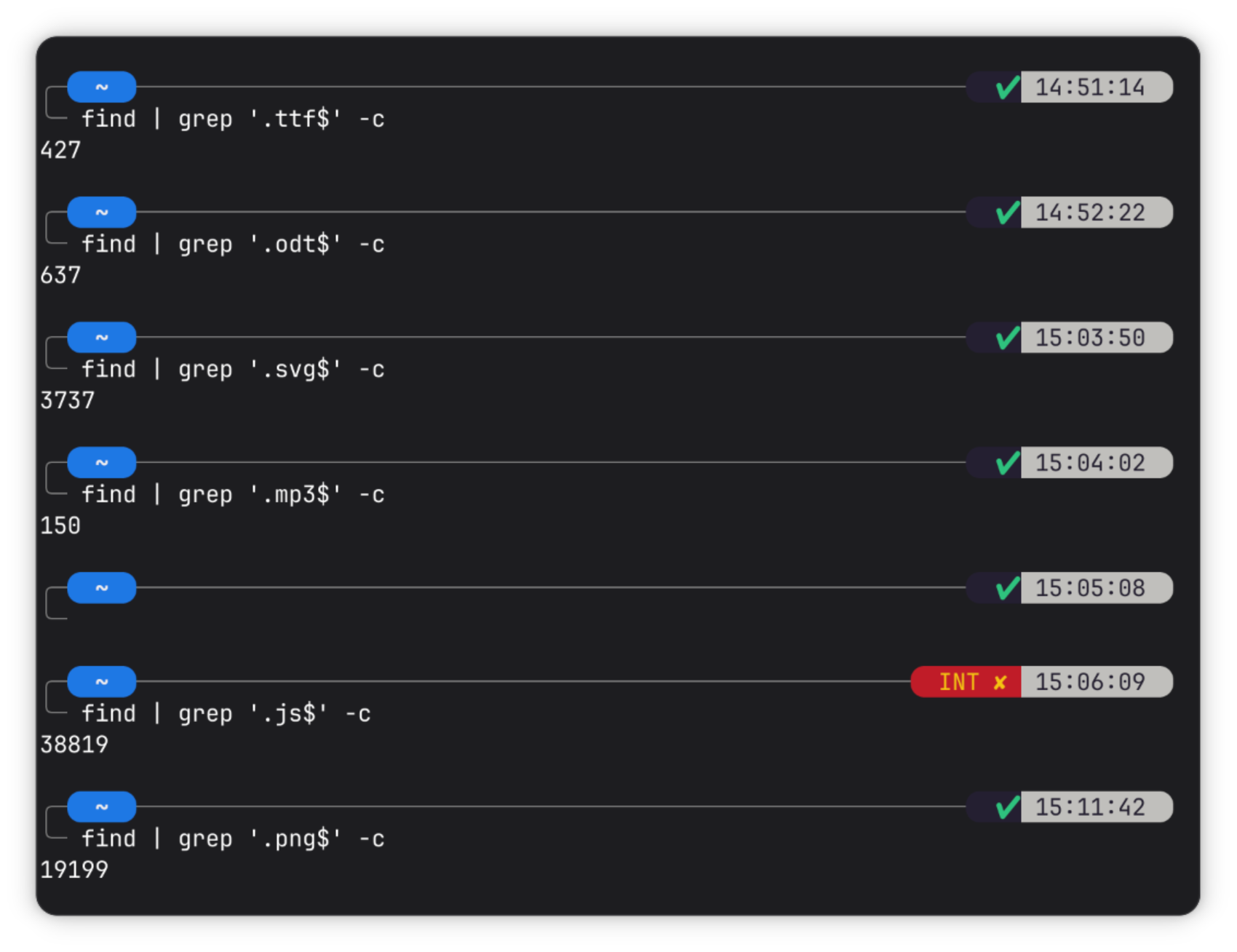
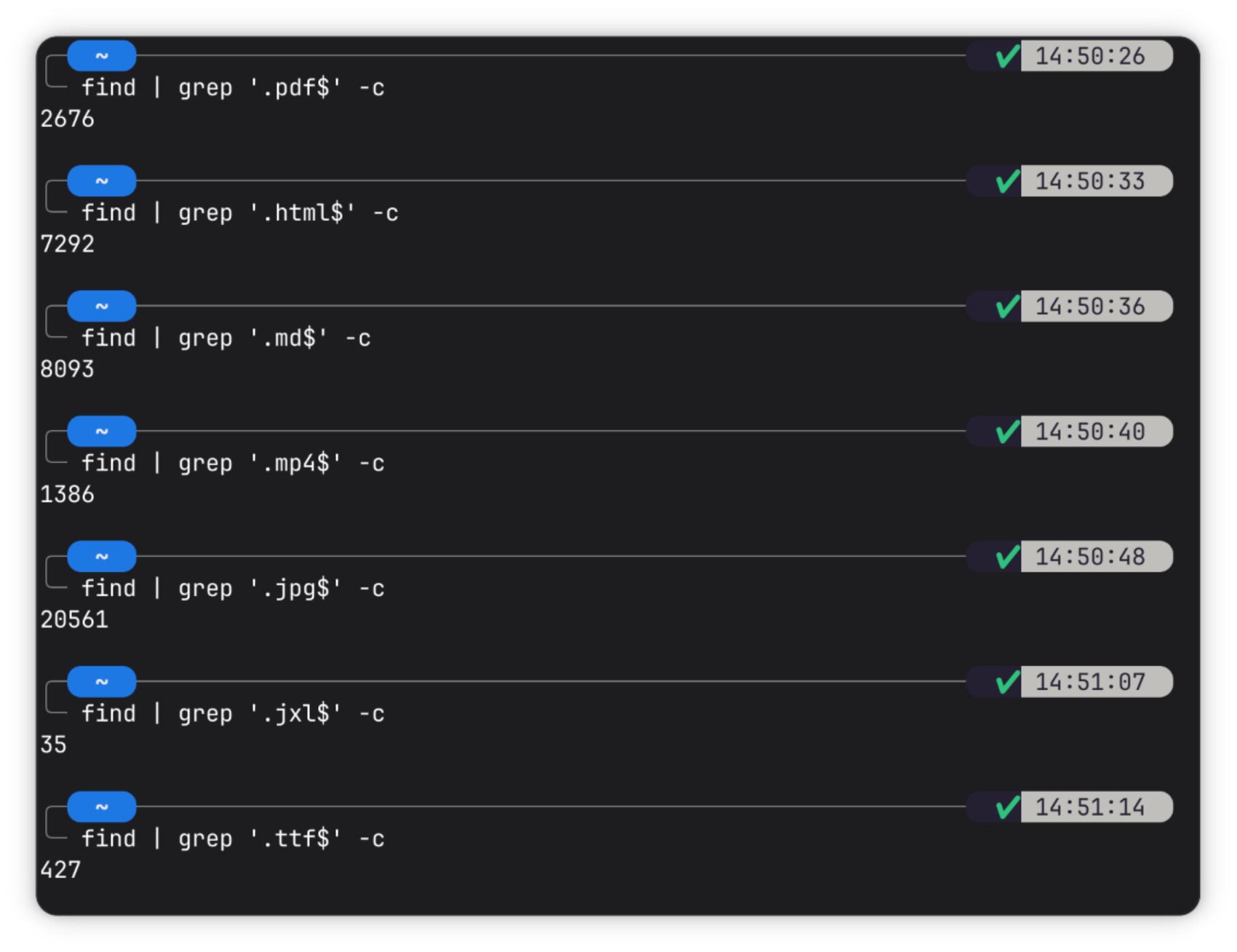
<p>💾 The File Count Challenge 🔎</p><p>Have you ever wondered how many PDFs, images, videos, or particular kind of files you have on your device? It is the time to find out.</p><p>I am hereby proud to officially launch a Fedi-wide file count challenge, in exclusive partnership with the 2025-27 class of <span class="h-card"><a href="https://post.lurk.org/@xpub" class="u-url mention" rel="nofollow noopener noreferrer" target="_blank">@<span>xpub</span></a></span> 👾</p><p>💁 How to participate</p><p>Go to your main device (not mobile)<br>Open the terminal<br>Run find . | grep '.pdf$' -c (on Windows: gci -r | where Name -match '\.pdf$')<br>Repeat the previous command, replacing “pdf” with any file format you are interested in sharing. We suggest: jpg, mp3, and png. 🔆 Bonus: html, js, ttf, odt, svg<br>Take a screenshot of the output<br>Share the screenshot on the Fediverse, using the <a href="/tags/filecountchallenge/" rel="tag">#fileCountChallenge</a> hashtag (please, copy-paste the actual text from the terminal in the image description/alt text)<br>Add your (user)name and results to <a href="https://pad.xpub.nl/p/filecount-scoreboard" rel="nofollow">the scoreboard</a><br>🆒 Bonus: share the story explaining why you have so many/little files for one format.</p><p>🏆 Awards</p><p>There is a secret prize for the three people who have the most PDFs, JPEGs, and HTMLs. More info to follow.</p><p>Boost, share, fork… Do whatever you want, but please have fun while doing it.</p><p>I willl keep writing updates. Yaaaaaaay ⌨️⌨️⌨️⌨️⌨️⌨️⌨️⌨️⌨️⌨️⌨️⌨️⌨️⌨️⌨️⌨️⌨️</p><p><a href="/tags/filecountchallenge/" rel="tag">#fileCountChallenge</a> <a href="/tags/filecount/" rel="tag">#fileCount</a> <a href="/tags/xpub/" rel="tag">#XPUB</a> <a href="/tags/challenge/" rel="tag">#challenge</a> <a href="/tags/terminal/" rel="tag">#terminal</a> <a href="/tags/linux/" rel="tag">#Linux</a> <a href="/tags/cmd/" rel="tag">#cmd</a> <a href="/tags/cli/" rel="tag">#CLI</a> <a href="/tags/find/" rel="tag">#find</a> <a href="/tags/grep/" rel="tag">#grep</a> <a href="/tags/filesystem/" rel="tag">#filesystem</a> <a href="/tags/file/" rel="tag">#file</a> <a href="/tags/files/" rel="tag">#files</a></p>
Edited 69d ago

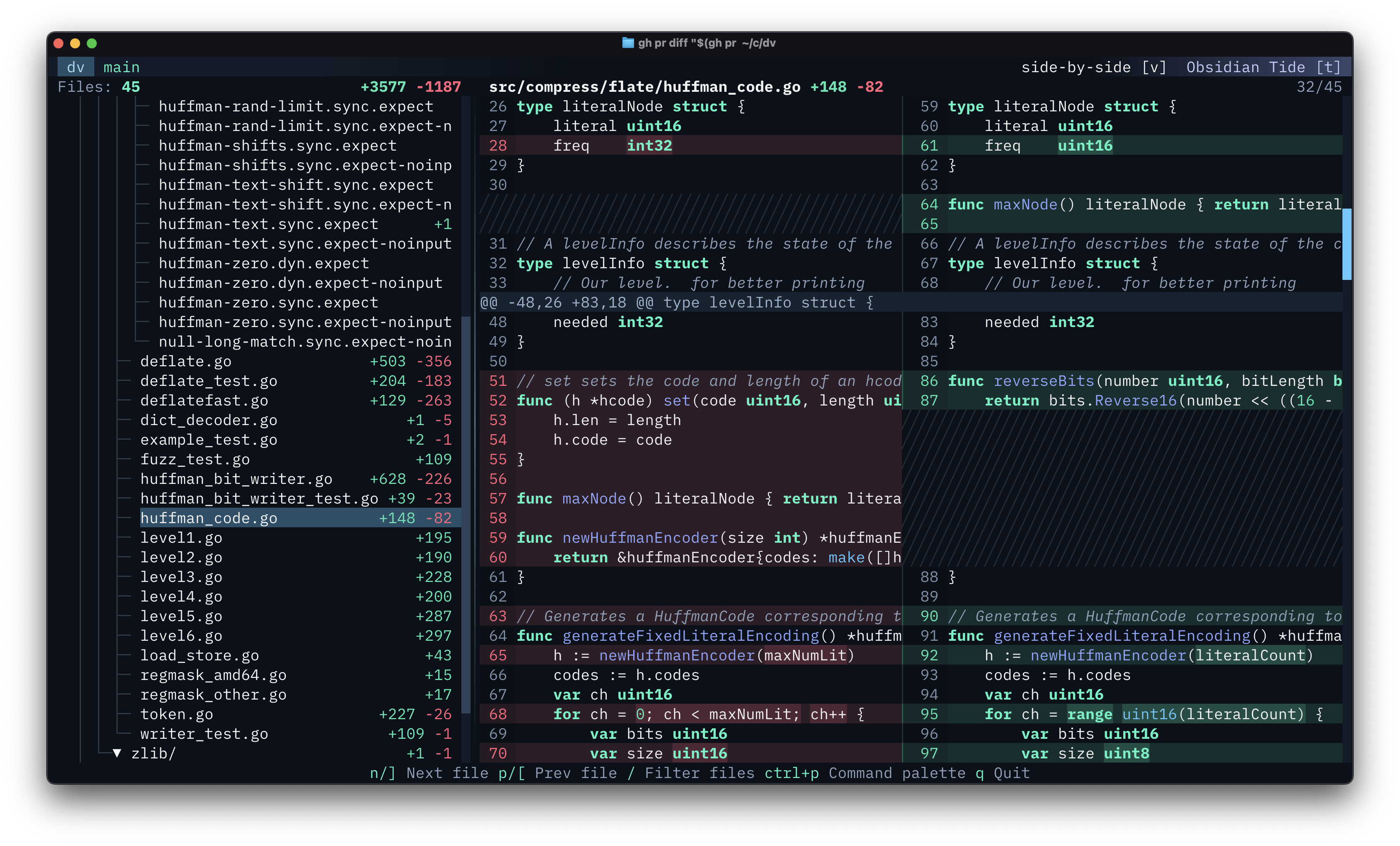
<p>I just open sourced dv - a terminal app for browsing diffs.</p><p>It's still pretty fresh, but if you have any feedback or ideas let me know!</p><p><a href="https://github.com/darrenburns/dv" rel="nofollow"><span class="invisible">https://</span>github.com/darrenburns/dv</a></p><p><a href="/tags/tui/" rel="tag">#tui</a> <a href="/tags/cli/" rel="tag">#cli</a> <a href="/tags/opensource/" rel="tag">#openSource</a> <a href="/tags/terminal/" rel="tag">#terminal</a> <a href="/tags/git/" rel="tag">#git</a> <a href="/tags/github/" rel="tag">#github</a> <a href="/tags/tools/" rel="tag">#tools</a> <a href="/tags/software/" rel="tag">#software</a></p>