<p>If you're a visual learner, this quick video tutorial offers the step-by-step on how to make a custom feed on Surf. </p><p><a href="https://flipboard.video/w/1ZSd6THJmvSLJstkRiq78m" rel="nofollow" class="ellipsis" title="flipboard.video/w/1ZSd6THJmvSLJstkRiq78m"><span class="invisible">https://</span><span class="ellipsis">flipboard.video/w/1ZSd6THJmvSL</span><span class="invisible">JstkRiq78m</span></a></p><p>We've created a new channel on <span class="h-card"><a href="https://framapiaf.org/@peertube" class="u-url mention" rel="nofollow noopener noreferrer" target="_blank">@<span>peertube</span></a></span> to house this and future how-to videos. Give it a follow if you like: <span class="h-card"><a href="https://flipboard.video/video-channels/surf" class="u-url mention" rel="nofollow noopener noreferrer" target="_blank">@<span>surf</span></a></span></p><p><a href="/tags/customfeeds/" rel="tag">#customfeeds</a> <a href="/tags/socialweb/" rel="tag">#socialweb</a> <a href="/tags/surffeeds/" rel="tag">#SurfFeeds</a></p>
customfeeds
<p>You can use Surf to create a custom feed about anything you like — add hashtags, RSS, YouTube and podcasts feeds, <span class="h-card"><a href="https://flipboard.social/@Flipboard" class="u-url mention" rel="nofollow noopener noreferrer" target="_blank">@<span>Flipboard</span></a></span> Magazines and social profiles, then filter and refine till you get things just how you want them. Here's how, plus a thread with a few feeds we like.</p><p><a href="/tags/surfsocial/" rel="tag">#SurfSocial</a> <a href="/tags/surffeeds/" rel="tag">#SurfFeeds</a> <a href="/tags/flipboard/" rel="tag">#Flipboard</a> <a href="/tags/customfeeds/" rel="tag">#CustomFeeds</a></p>
<p>Another quiet week in the news, with nothing much to report… But if you do want to follow the very little, totally inconsequential stuff that's happening, here’s a thread of news- and politics-related <a href="/tags/customfeeds/" rel="tag">#CustomFeeds</a> that have been created using Surf, plus a video on how to build a feed using our Starter Sets.</p><p><a href="/tags/flipboard/" rel="tag">#Flipboard</a> <a href="/tags/surfsocial/" rel="tag">#SurfSocial</a> <a href="/tags/surffeeds/" rel="tag">#SurfFeeds</a> <a href="/tags/news/" rel="tag">#News</a> <a href="/tags/politics/" rel="tag">#Politics</a></p>
<p>In another news-packed week, here’s a thread full of palate-cleansing custom feeds created with Surf about everything from queer country music to the demoscene. Here's a quick guide to creating a custom feed.</p><p><a href="/tags/surfsocial/" rel="tag">#SurfSocial</a> <a href="/tags/surffeeds/" rel="tag">#SurfFeeds</a> <a href="/tags/opensocial/" rel="tag">#OpenSocial</a> <a href="/tags/opensocialweb/" rel="tag">#OpenSocialWeb</a> <a href="/tags/flipboard/" rel="tag">#Flipboard</a> <a href="/tags/customfeeds/" rel="tag">#CustomFeeds</a></p>
<p>If you’re in the Surf beta, you can make topical feeds about anything from the <a href="/tags/gratefuldead/" rel="tag">#GratefulDead</a> to Destiny 2 — and the people featured in this thread did. Here’s a quick video on how to build a feed.</p><p><a href="/tags/flipboard/" rel="tag">#Flipboard</a> <a href="/tags/surfsocial/" rel="tag">#SurfSocial</a> <a href="/tags/surffeeds/" rel="tag">#SurfFeeds</a> <a href="/tags/customfeeds/" rel="tag">#CustomFeeds</a></p>
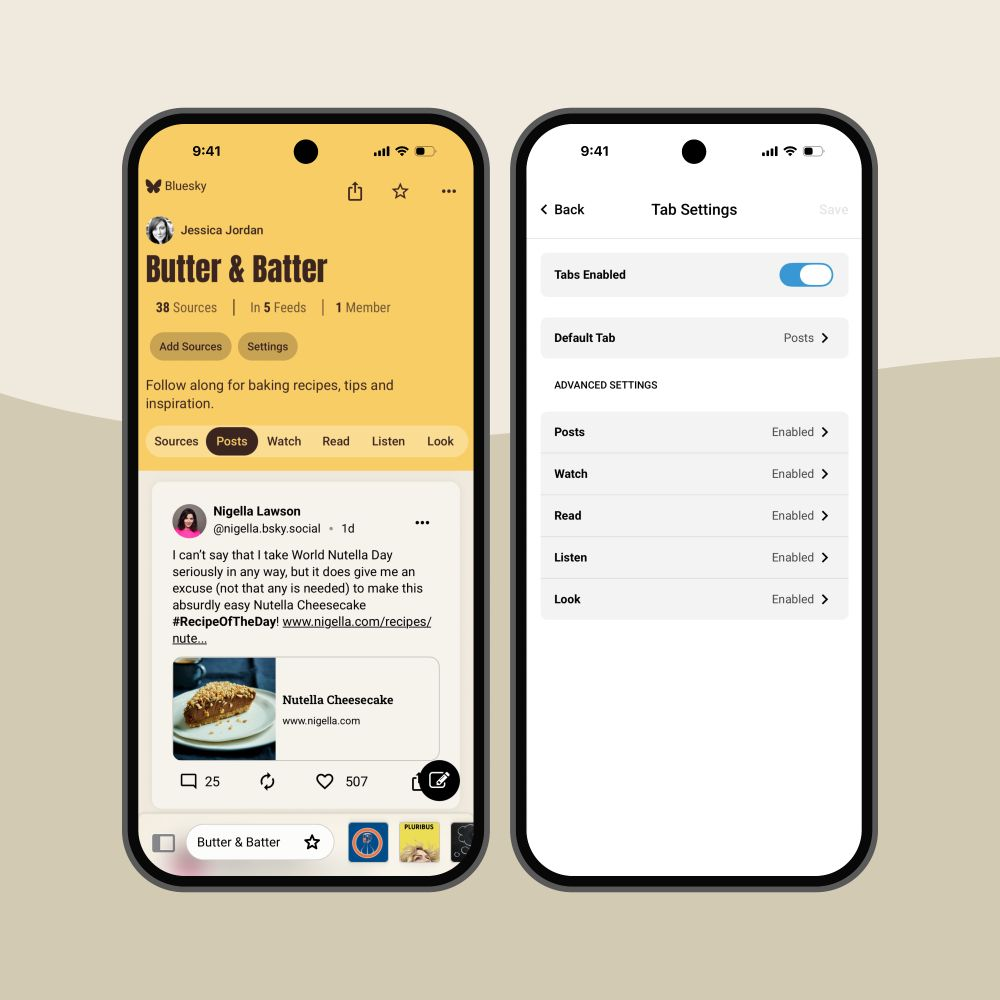
<p>🎉 Version 1.0.356 of Surf is live on TestFlight and Android. Now, you have deeper customization options for your feeds — set your default tabs according to the type of content you want to highlight, filter by Bluesky or Mastodon, or even use Surf as your RSS reader. </p><p><a href="/tags/socialmedia/" rel="tag">#SocialMedia</a> <a href="/tags/customfeeds/" rel="tag">#CustomFeeds</a> <a href="/tags/surfsocial/" rel="tag">#SurfSocial</a> <a href="/tags/surffeeds/" rel="tag">#SurfFeeds</a> <a href="/tags/rss/" rel="tag">#RSS</a></p>