


 🇺🇦🇵🇸🏳️🌈🏳️⚧️
@FediTips
You can't assume that when you mark a #post for #deletion that it will be #deleted across the #fediverse. Whether a post gets deleted on a remote #server is entirely up to that server.
I guarantee you there are organizations and individuals here on the Fediverse right now that are running their own #ActivityPub servers and are #archiving and #cataloging every post, and they are #ignoring any #Delete #requests.
Because when you mark a post for deletion, that's all you're doing. You're requesting the remote server to delete the post from its #database.
And nobody is required to do that.
(Though the vast majority of ActivityPub servers do.)
#FediTips
RE: https://social.growyourown.services/users/FediTips/statuses/113669267720362794
feditips
If you want to hide your Mastodon profile's follow and follower lists, here's how to do it:
1. Log in through your server’s website or web app
2. Click on your profile icon (your profile picture), then click "Edit profile"
3. Click on the "Privacy & Reach" tab at the top
4. Scroll down to the option marked "Show follows and followers on profile", and UN-tick it
5. Click the "Save changes" button at the bottom
In case you missed it, I have a website which has thousands of handpicked Fediverse accounts to follow organised into hundreds of topics:
To find out more about an account, click on its Fediverse address.
To follow an account, copy-paste its Fediverse address into your search box in Mastodon etc.
Edited 298d ago
If you see something nasty or problematic on here, report it. Reporting is how admins find out about problems, so it's important that you speak up if you see something is wrong or if someone is being bullied.
To report something, click on a post or profile, then ⋯ and then "Report". There's a complete guide to reporting problematic posts and accounts here:
➡️ https://fedi.tips/how-do-i-report-a-post-or-account-that-is-doing-something-bad
The guide also answers questions about reporting. Let me know if I've missed something 🙂
Edited 1y ago
Not many people know this, but Mastodon has a built-in official post scheduling system which can publish posts at pre-arranged times and dates.
Unfortunately there's no official interface for the scheduler yet, so you have to use a third party app to access the scheduler. These third party apps let you use it:
 Android: Tusky, Fedilab, Moshidon & Subway Tooter
 iPhone/iPad: Mona
🌐 Web: https://plan.fedilab.app
More info at https://fedi.tips/scheduling-posts-on-mastodon
You can use animated GIFs for your Mastodon profile's avatar and header image. However, these may not animate automatically for some people depending on their settings or app. If they don't animate automatically, they can usually be activated by clicking on them or hovering a mouse pointer over them.
⚠️ DO NOT use any kind of rapidly flashing animations! These can be extremely dangerous for people with certain neurological conditions. More info at https://fedi.tips/dont-use-flashing-images-or-emoji
When you're signing up on a server or moving your account to a different server, you have to choose a username. This is the name that appears when people mention you in posts (when they @ you). It's worth spending a bit of time on choosing a good one, because it's difficult to change it later.
Here are some tips on how to choose a good username:
➡️ https://fedi.tips/choosing-a-good-username-on-mastodon-and-the-fediverse
It also goes over options for changing the username if you have to.
Edited 1y ago
You don't need to use your real name or photo on here. It is 100% fine to be anonymous, or to use whatever name or image suits you best (as long as you're not trying to impersonate/abuse someone else).
Also, don't assume that a blank profile picture means anything bad. Some people have a permanently blank profile image as they are blind, and they use the internet via audio-only tools.
One of the big advantages of being on here is that it's easy to talk directly to the people who run your server 🙂
If you want to contact your server's admin on Mastodon:
1. Go to your server's website
2. On the mobile web click ⋯ at the right, or on the desktop web click the higher "About" link on the left. Both of these will take you to your server's About page.
3. Your admin's Mastodon account is listed under "Administered by", and their public email address is under "Contact".
In case you missed it, the Fediverse's livestreaming platform OwnCast has official apps:
iPhone, iPad, Apple TV
https://apps.apple.com/app/owncasts/id6451178968
📺 Roku
https://channelstore.roku.com/details/2179326b6b85869a1a3a18d48ca76de6/owncasts
You don't have to use these though, all of OwnCast's features are available through the web.
(OwnCast is like the Fediverse's alternative to Twitch, it's a livestreaming platform with a built-in chat service. More info at https://fedi.tips/owncast-live-streaming-and-chat-on-the-fediverse)
If you're wanting to discuss a particular year, you might have noticed that number-only hashtags don't work on here.
To get round this, a lot of people use the word "year" before the number, for example #Year2024 or #Year2025
(By the way, there is a discussion about this issue on Mastodon's Github page at https://github.com/mastodon/mastodon/issues/9709)

Ω🪬Ω
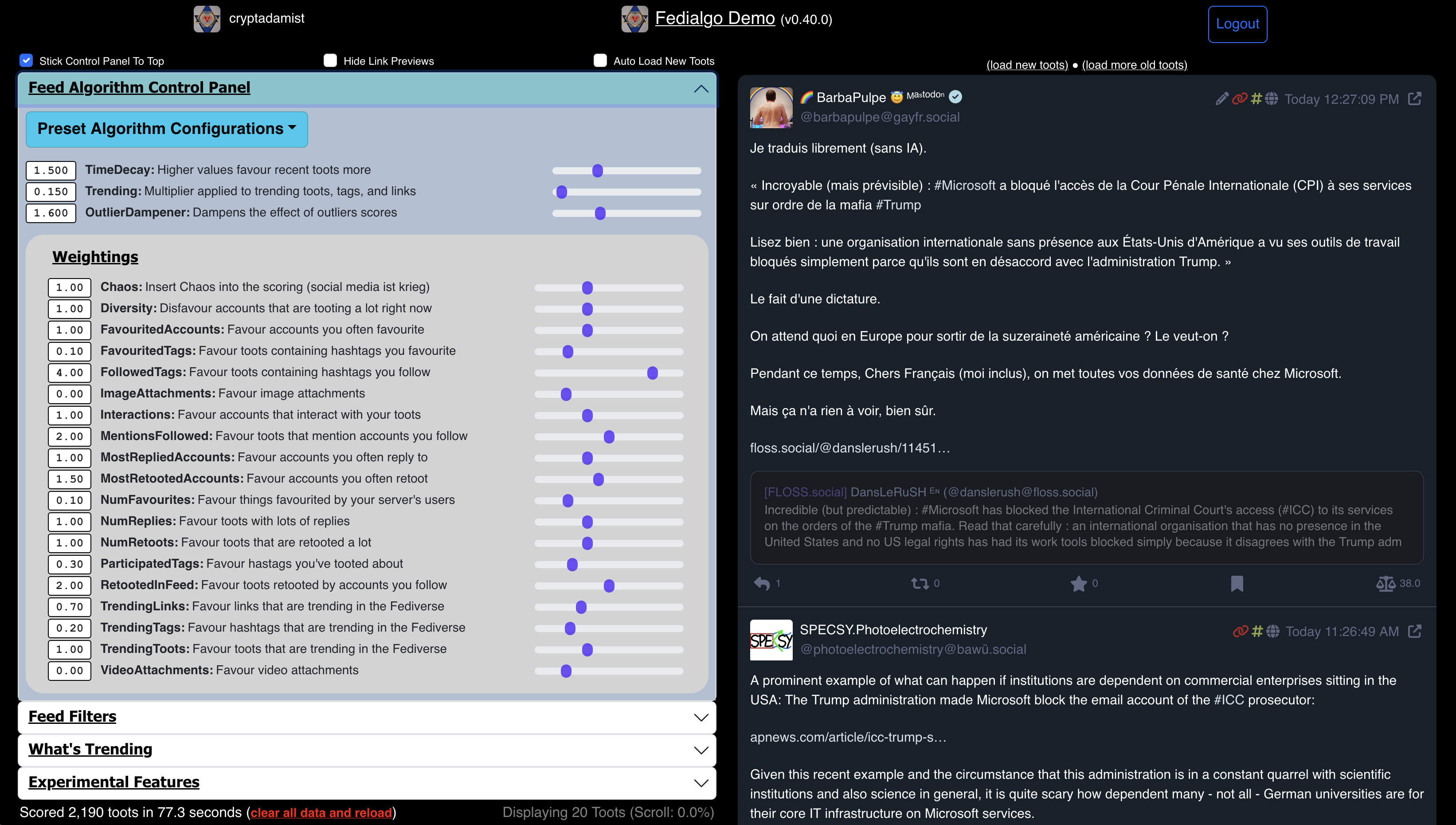
#FediAlgo, the customizable timeline algorithm / filtering system for your Mastodon feed, is now deployed on Github Pages and can be used from your web browser.
* Link: https://michelcrypt4d4mus.github.io/fedialgo_demo_app_foryoufeed/
* Code: https://github.com/michelcrypt4d4mus/fedialgo_demo_app_foryoufeed
* Video of FediAlgo in action: https://universeodon.com/@cryptadamist/114395249311910522
#activitypub #algorithm #algorithmicFeed #algorithmicTimeline #Fedi #FediTips #FediTools #Fediverse #Feed #FOSS #Masto #MastoAdmin #Mastodon #mastohelp #MastoJS #nodejs #nod #opensource #SocialWeb #timeline #TL #webdev
Edited 1y ago
Hey book fans, did you know there is a Fediverse alternative to Amazon's Goodreads called BookWyrm?
➡️ https://fedi.tips/bookwyrm-a-social-network-for-people-who-enjoy-reading
Just like Mastodon, there are lots of different BookWyrm servers that talk to each other:
➡️ https://joinbookwyrm.com/instances
You can also follow BookWyrm accounts from Mastodon etc.
BookWyrm lets you import your existing data from Goodreads, LibraryThing, StoryGraph, OpenLibrary & Calibre:
Edited 1y ago
If you see "🧵 1/3" or "2/5" or "🧵" or similar at the end of a post, it means it's part of a thread of posts.
You can create a thread here by replying to your own post, then replying to that reply, and repeating this until you have a long chain of posts called a thread.
You can see the thread a post comes from by clicking on it, this takes you to an enlarged view where you can scroll up or down to see the whole thread.
More info about creating threads at:
Edited 1y ago
There are four main timelines on Mastodon:
Home - Your default timeline, posts from people & tags & groups you follow
Explore/Trending - Shows most boosted recent posts, most used tags, most shared links
Local - Latest public posts from people on your server (also called Live Feeds: This Server)
Federated - Latest public posts visible to your server from across the Fediverse (also called Live Feeds: All)
More info about these on the timelines guide:
Have you posted a link on Mastodon and noticed an additional "More from..." link at the bottom?
If you click this, it will take you to the Mastodon profile of the person who wrote the article or runs the site you linked to. It's a special feature designed to help journalists and website owners connect with their readers.
You can find out more about it including step-by-step instructions on how to activate it for your own articles or sites at:
Mastodon lets you browse which hashtags you are already following:
- On the official app go to your profile page and click # at the top
- On the web interface go to your profile page, click ⋯ and then "Followed hashtags"
- On third party apps there will be various interfaces either on your profile or in settings
More info about hashtag following at:
➡️ https://fedi.tips/how-do-i-follow-hashtags-on-mastodon-and-the-fediverse
Mastodon supports post editing, you can edit any of your own posts any time by clicking ⋯ and then "Edit".
If you forget to add an image description, you can edit your post to add the description afterwards.
(Just mentioning this because still seeing people forgetting descriptions and adding them in replies, it seems they don't know about post editing.)
Lots more info and questions answered about post editing on Mastodon at:
Edited 1y ago
There are lots of different ways to discover accounts to follow on here, have you tried them all?
Carrying weapons across the Pomerium is not allowed
Are you writing a website link in your Mastodon post or profile? If so, remember to include https:// at the beginning so that people can click it!
example.com is written without https:// at the beginning and is just a piece of unclickable text.
https://example.com is written with https:// at the beginning and can be clicked to open its website.
If a profile on here looks blank, it might not actually be blank!
You can check if a profile is blank by clicking on ⋯ and then "Open in browser" or "Open original page". These will take you to the profile on its own server's website, which is the most up to date version of the profile.
Profiles may appear blank if no one on your server has followed it before. If you follow the account, its posts will start showing up on your server.
More info at https://fedi.tips/why-does-someones-account-page-look-completely-blank-is-it-really-blank
A good way to discover interesting accounts is to follow hashtags. When you follow a hashtag, posts with that tag will start appearing in your timeline even if you don't follow the post's author.
To follow a hashtag:
1. Search for a hashtag
2. Click on the specific hashtag you want from the suggestions
3. Click "Follow" button at the top
To manage your followed tags, go to your own profile page, click ⋯ and then "Followed hashtags".
More info at:
➡️ https://fedi.tips/how-do-i-follow-hashtags-on-mastodon-and-the-fediverse
Edited 1y ago
Hey new people, do you want help with using Mastodon? Feel free to ask by replying, or message me if you prefer. 🙂 Any question is fine, there is no such thing as a stupid question!
There is also lots of help for beginners on the website at https://fedi.tips (especially in the "Quick Start" section at the top).
If you're just wondering what the heck is going on here and want someone to explain Mastodon briefly and simply, watch this video: https://tilvids.com/w/f747058d-3991-4046-a1c9-29c184daa0ff
Edited 1y ago
Lots of questions about  Pixelfed right now! 😅
The most common Pixelfed questions are answered on the Fedi.Tips website at this link:
➡️ https://fedi.tips/pixelfed-photo-sharing-on-the-fediverse
If you want to find people to follow on Pixelfed, there's more info here:
➡️ https://fedi.tips/finding-people-to-follow-on-pixelfed
Here's how to import your data from Instagram to Pixelfed:
➡️ https://fedi.tips/how-do-i-import-my-instagram-account-data-to-pixelfed/
If you want to receive DMs from strangers on Pixelfed, you need to activate that option:
➡️ https://fedi.tips/dms-arent-getting-through-to-me-on-pixelfed-what-do-i-do
Edited 1y ago