<p>Hey new people on Mastodon, do you want your posts to be as visible and discoverable as possible?</p><p>If so, you might want to opt into "full text search". This means the entire contents of your public posts would be searchable and much easier to find.</p><p>If you don't opt in, your posts are only searchable by hashtag.</p><p>This guide tells you how to opt in, and answers common questions:</p><p>➡️ <a href="https://fedi.tips/how-do-i-opt-into-or-out-of-full-text-search-on-mastodon" rel="nofollow" class="ellipsis" title="fedi.tips/how-do-i-opt-into-or-out-of-full-text-search-on-mastodon"><span class="invisible">https://</span><span class="ellipsis">fedi.tips/how-do-i-opt-into-or</span><span class="invisible">-out-of-full-text-search-on-mastodon</span></a></p><p>(This only affects public posts. Non-public posts aren't searchable.)</p><p><a href="/tags/feditips/" rel="tag">#FediTips</a> <a href="/tags/mastodon/" rel="tag">#Mastodon</a></p>
Edited 1y ago
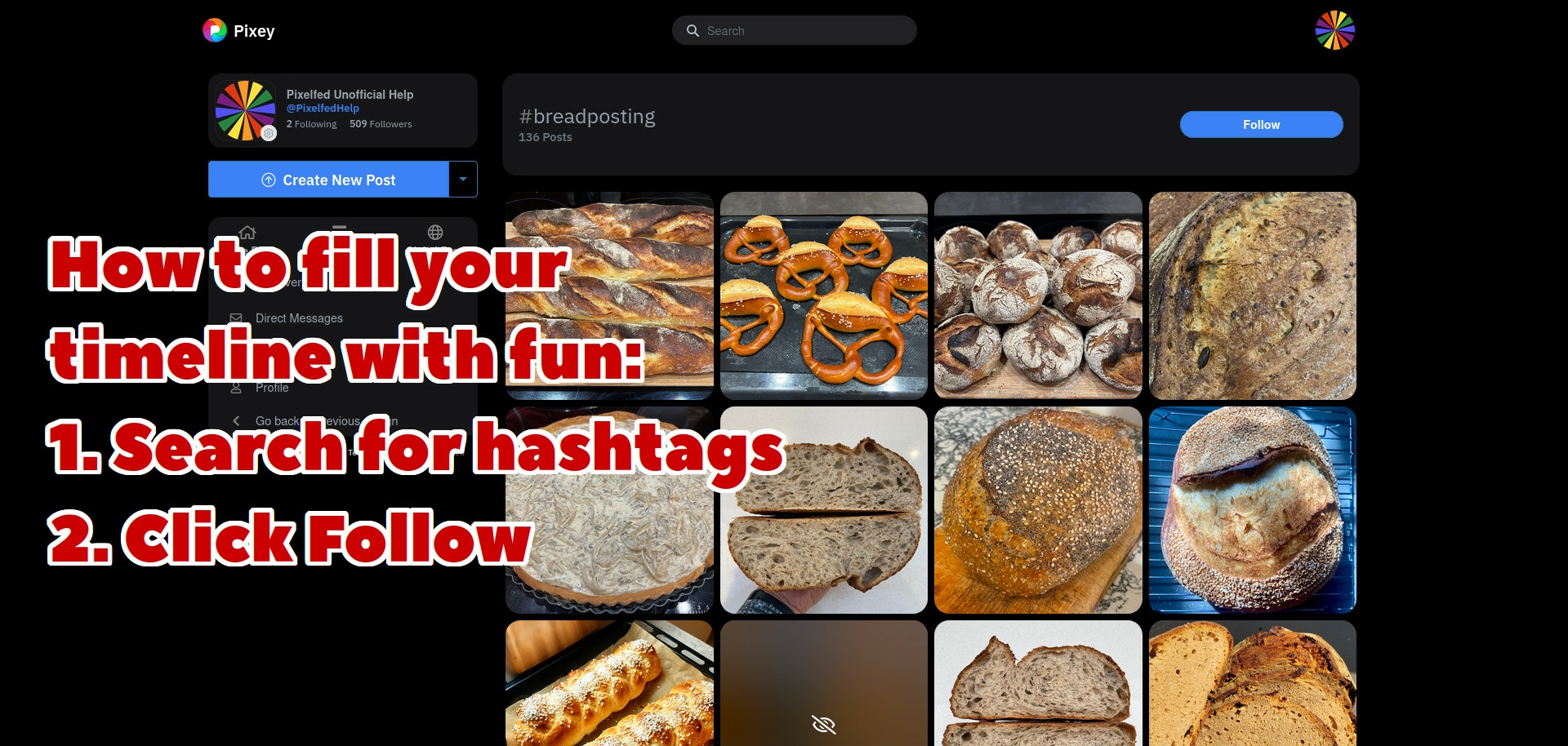
There is no algorithm on Pixelfed, it's entirely up to you to decide what goes in your timeline. One of the best ways to fill your timeline with stuff you're interested in is to follow hashtags:<br><br>1. Search for a hashtag remembering to include # at the beginning<br>2. Choose the hashtag you want from the list of suggestions<br>3. Click the "Follow" button at the top<br><br>Once you've followed a hashtag, posts with that hashtag will gradually start to appear in your timeline even if you don't follow the person who made it.<br><br>If you want to keep track of your followed hashtags go to Account Settings > Relationships > Hashtags<br><br><a href="/tags/feditips/" rel="tag">#FediTips</a> <a href="/tags/pixelfed/" rel="tag">#Pixelfed</a> <a href="/tags/pixelfedtips/" rel="tag">#PixelfedTips</a>
<p>Are you using Mastodon on a computer? If so, you might want to try out Mastodon's "Advanced Web Interface". It has a multicolumn layout similar to TweetDeck, and is built into all Mastodon servers:</p><p>➡️ <a href="https://fedi.tips/how-to-activate-mastodons-tweetdeck-style-advanced-web-interface" rel="nofollow" class="ellipsis" title="fedi.tips/how-to-activate-mastodons-tweetdeck-style-advanced-web-interface"><span class="invisible">https://</span><span class="ellipsis">fedi.tips/how-to-activate-mast</span><span class="invisible">odons-tweetdeck-style-advanced-web-interface</span></a></p><p>This guide tells you how to activate and use it, as well as answers to lots of common questions about it.</p><p>Some people find multicolumn mode essential, while others find it overwhelming. You can use whichever interface you prefer 🙂 </p><p><a href="/tags/feditips/" rel="tag">#FediTips</a> <a href="/tags/mastodon/" rel="tag">#Mastodon</a></p>
Edited 1y ago
<p>You can customise what appears on your timeline using Mastodon's Filters feature. It lets you automatically hide posts containing certain words, phrases, hashtags, links or emoji. This guide explains how to use Mastodon filters and answers lots of common questions:</p><p>➡️ <a href="https://fedi.tips/filtering-your-timeline-to-hide-posts-on-mastodon" rel="nofollow" class="ellipsis" title="fedi.tips/filtering-your-timeline-to-hide-posts-on-mastodon"><span class="invisible">https://</span><span class="ellipsis">fedi.tips/filtering-your-timel</span><span class="invisible">ine-to-hide-posts-on-mastodon</span></a></p><p>Filtered posts can be either hidden completely, or hidden behind a warning that can be clicked open.</p><p>Filters give you the ability to hide whatever you don't want to see, from NSFW to Wordle.</p><p><a href="/tags/feditips/" rel="tag">#FediTips</a></p>
<p>You can attach photos, video or audio to your posts on Mastodon:</p><p>🖼️ Images can be up four PNG, JPG, HEIF, WEBP, AVIF or GIFs up to 16MB each</p><p>📺 Video can be MP4, M4V, MOV or WebM up to 99MB</p><p>🎧 Audio can be MP3, OGG, WAV, FLAC, OPUS, AAC, M4A or 3GP up to 99MB</p><p>Note that there is no length limit! You can post any length of video or audio as long as it is within the file size limit.</p><p>There is lots more info about attaching media to Mastodon posts at:</p><p>➡️ <a href="https://fedi.tips/how-do-i-post-images-videos-or-audio-in-mastodon-what-can-i-attach-to-a-post-how-do-i-post-gifs" rel="nofollow" class="ellipsis" title="fedi.tips/how-do-i-post-images-videos-or-audio-in-mastodon-what-can-i-attach-to-a-post-how-do-i-post-gifs"><span class="invisible">https://</span><span class="ellipsis">fedi.tips/how-do-i-post-images</span><span class="invisible">-videos-or-audio-in-mastodon-what-can-i-attach-to-a-post-how-do-i-post-gifs</span></a></p><p><a href="/tags/feditips/" rel="tag">#FediTips</a> <a href="/tags/mastodon/" rel="tag">#Mastodon</a></p>
<p>If you're wanting to join Pixelfed, you don't have to join pixelfed.social. There are other Pixelfed servers you can join instead, which will help spread the load and keep the network safe from being taken over.</p><p>For example here are three Pixelfed servers that have reliable people running them:</p><p><a href="https://pixelfed.de" rel="nofollow"><span class="invisible">https://</span>pixelfed.de</a><br><a href="https://pixey.org" rel="nofollow"><span class="invisible">https://</span>pixey.org</a><br><a href="https://gram.social" rel="nofollow"><span class="invisible">https://</span>gram.social</a></p><p>There are even more listed on the official Pixelfed website at <a href="https://pixelfed.org/servers" rel="nofollow"><span class="invisible">https://</span>pixelfed.org/servers</a></p><p><a href="/tags/pixelfed/" rel="tag">#Pixelfed</a> <a href="/tags/feditips/" rel="tag">#FediTips</a></p>
<p>In case you missed it, there are lots of ways to discover accounts to follow on here at:</p><p>➡️ <a href="https://fedi.tips/how-do-i-find-accounts-to-follow-on-mastodon-and-the-fediverse-how-do-i-find-my-friends" rel="nofollow" class="ellipsis" title="fedi.tips/how-do-i-find-accounts-to-follow-on-mastodon-and-the-fediverse-how-do-i-find-my-friends"><span class="invisible">https://</span><span class="ellipsis">fedi.tips/how-do-i-find-accoun</span><span class="invisible">ts-to-follow-on-mastodon-and-the-fediverse-how-do-i-find-my-friends</span></a></p><p>There are also lots of ways to make your own account and posts more discoverable:</p><p>➡️ <a href="https://fedi.tips/how-do-i-get-more-followers-on-mastodon-and-the-fediverse" rel="nofollow" class="ellipsis" title="fedi.tips/how-do-i-get-more-followers-on-mastodon-and-the-fediverse"><span class="invisible">https://</span><span class="ellipsis">fedi.tips/how-do-i-get-more-fo</span><span class="invisible">llowers-on-mastodon-and-the-fediverse</span></a></p><p>(Apologies to the people who've seen these links posted recently, but these two things seem to be the most frequent questions by new people right now!)</p><p><a href="/tags/feditips/" rel="tag">#FediTips</a></p>
<p>Bonjour ! 🦅</p><p>« Faudrait peut-être que je migre d'instance... Ah mais attends, comment on fait ? On peut migrer ses messages ? Et pourquoi mes abonnements sont pas transférés ? »</p><p>Aujourd'hui, pour ce deuxième billet de blog des tutos du Fediverse, après vous avoir parlé du choix de son instance (<a href="https://blog.piaille.fr/choix-instance/" rel="nofollow" class="ellipsis" title="blog.piaille.fr/choix-instance/"><span class="invisible">https://</span><span class="ellipsis">blog.piaille.fr/choix-instance</span><span class="invisible">/</span></a>), on vous explique pourquoi migrer son compte Mastodon peut avoir un intérêt, et une procédure pas-à-pas pour le faire.</p><p>Bonne lecture !</p><p><a href="https://blog.piaille.fr/migrer-instance/" rel="nofollow" class="ellipsis" title="blog.piaille.fr/migrer-instance/"><span class="invisible">https://</span><span class="ellipsis">blog.piaille.fr/migrer-instanc</span><span class="invisible">e/</span></a></p><p><a href="/tags/feditips/" rel="tag">#FediTips</a> <a href="/tags/askfedi/" rel="tag">#AskFedi</a></p>
<p><img src="https://neodb.social/media/emoji/mastodon.zaclys.com/boost_requested.png" class="emoji" alt=":boost_requested:" title=":boost_requested:"> Je crois que c'est la bonne journée pour rappeler l'existence d'une liste collaborative des hashtags utiles / populaires sur Mastodon (lae Fédivers⋅e)</p><p><a href="https://yeswiki.lescommuns.org/?hashtags-mastodon" rel="nofollow" class="ellipsis" title="yeswiki.lescommuns.org/?hashtags-mastodon"><span class="invisible">https://</span><span class="ellipsis">yeswiki.lescommuns.org/?hashta</span><span class="invisible">gs-mastodon</span></a></p><p>Bienvenue tout le monde ! 🙂</p><p><a href="/tags/mastotips/" rel="tag">#MastoTips</a> <a href="/tags/feditips/" rel="tag">#FediTips</a> <a href="/tags/mastohelp/" rel="tag">#MastoHelp</a> <a href="/tags/introduction/" rel="tag">#Introduction</a></p>
Edited 1y ago
<p>Are you happy with your Mastodon server? Would you like to invite your Mastodon-curious friends to join you? Here's how to do it:</p><p>1. Log in on your server’s website or the web app<br>2. Click on ⚙️ Preferences<br>3. Click on "Invite people" at the left of the screen (if you’re on the mobile website click ☰ in the top right and then Invite people)<br>4. Choose the settings you want for your invitation link and then click Generate</p><p>Share the link with friends, community groups or whoever 🙂 </p><p><a href="/tags/feditips/" rel="tag">#FediTips</a></p>
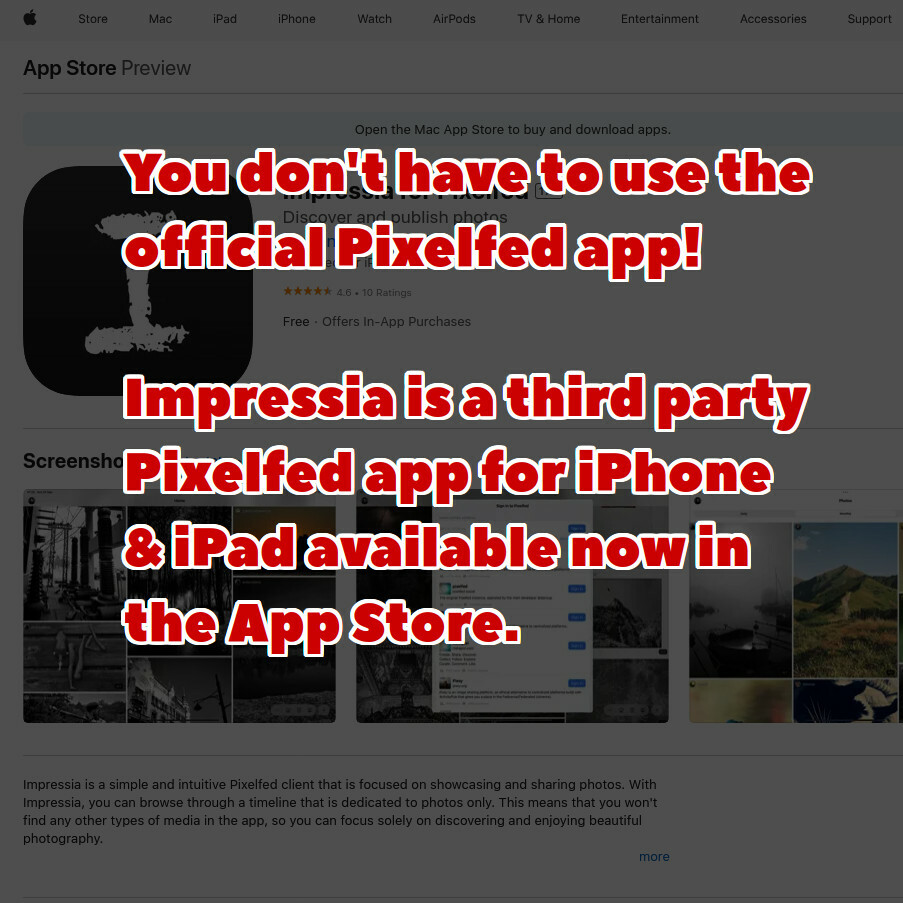
You don't have to use the official Pixelfed app, you can use your Pixelfed account with third party apps too. You can download Impressia for iPhone & iPad at <a href="https://apps.apple.com/app/impressia-for-pixelfed/id1663543216" rel="nofollow" class="ellipsis" title="apps.apple.com/app/impressia-for-pixelfed/id1663543216"><span class="invisible">https://</span><span class="ellipsis">apps.apple.com/app/impressia-f</span><span class="invisible">or-pixelfed/id1663543216</span></a><br><br><a href="/tags/pixelfed/" rel="tag">#Pixelfed</a> <a href="/tags/pixelfedtips/" rel="tag">#PixelfedTips</a> <a href="/tags/feditips/" rel="tag">#FediTips</a>
<p>Are you trying to find interesting accounts to follow on here about specific topics?</p><p>You can see thousands of recommended accounts to follow organised into topics and categories at:</p><p>➡️ <a href="https://fedi.directory" rel="nofollow"><span class="invisible">https://</span>fedi.directory</a></p><p>To find out more about an account, click on its Fediverse address.</p><p>To follow an account, paste its Fediverse address into your search box on Mastodon etc.</p><p><a href="/tags/feditips/" rel="tag">#FediTips</a> <a href="/tags/fediverse/" rel="tag">#Fediverse</a></p>
<p>Have you ever seen a reply in your timeline and wondered what it is actually replying to? Just click on it to find out, this should take you to the thread that it is part of.</p><p>If that doesn't work, try refreshing or reloading the page.</p><p>If you can see the thread but you're not sure it's up to date, you can check for the most complete version by viewing its "original page", more info about these at <a href="https://fedi.tips/what-are-original-pages-in-mastodon" rel="nofollow" class="ellipsis" title="fedi.tips/what-are-original-pages-in-mastodon"><span class="invisible">https://</span><span class="ellipsis">fedi.tips/what-are-original-pa</span><span class="invisible">ges-in-mastodon</span></a></p><p><a href="/tags/feditips/" rel="tag">#FediTips</a></p>
Edited 1y ago
<p>Hey new people, you don't need to use link shorteners on Mastodon 🙂 </p><p>All links on Mastodon are counted as 23 characters towards your post size limit, regardless of how long they actually are.</p><p>More info at <a href="https://fedi.tips/you-dont-need-link-shorteners-on-mastodon" rel="nofollow" class="ellipsis" title="fedi.tips/you-dont-need-link-shorteners-on-mastodon"><span class="invisible">https://</span><span class="ellipsis">fedi.tips/you-dont-need-link-s</span><span class="invisible">horteners-on-mastodon</span></a></p><p><a href="/tags/feditips/" rel="tag">#FediTips</a> <a href="/tags/mastotips/" rel="tag">#MastoTips</a> <a href="/tags/mastodon/" rel="tag">#Mastodon</a></p>
Edited 1y ago
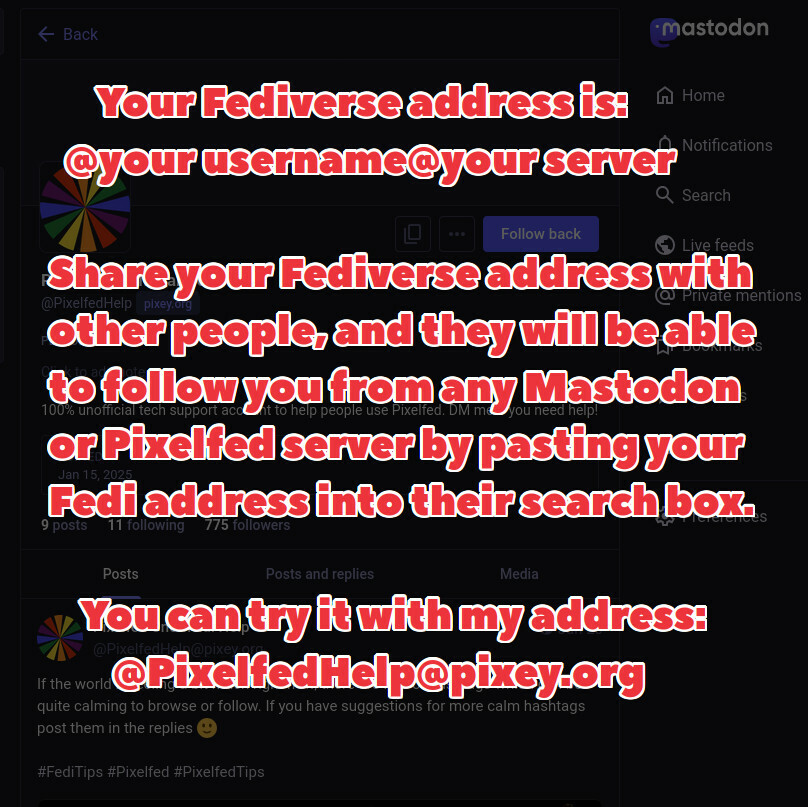
Every account on Pixelfed, Mastodon and the rest of the Fediverse has a unique address called a "Fediverse address" or "account address". It's always in this form:<br><br>@ (your username) @ (your server)<br><br>You can usually see people's Fedi addresses on their profile pages next to their usernames, and these are also often shown on posts too.<br><br>These addresses are really useful because anyone on any server can paste the address into the search box on their server (either in the website or the app) and the account will appear, even if their server hasn't noticed your account yet.<br><br>You can try it out right now by pasting my address into the search box on Mastodon, Pixelfed or most other Fediverse platforms:<br><br>@ PixelfedHelp @ pixey.org (but without the spaces)<br><br><a href="/tags/pixelfed/" rel="tag">#Pixelfed</a> <a href="/tags/pixelfedtips/" rel="tag">#PixelfedTips</a> <a href="/tags/feditips/" rel="tag">#FediTips</a>
<p>If you use your Mastodon server's website or web app, your profile contains lots of useful info behind its ⋯ button including:</p><p>-Pinned posts<br>-Follow requests<br>-Favourites<br>-Lists<br>-Followed hashtags<br>-Muted users<br>-Blocked users<br>-Blocked domains (blocked servers)</p><p>The ⋯ button is next to the "Edit Profile" button on your profile page. Click on your profile picture to get to your profile page.</p><p><a href="/tags/feditips/" rel="tag">#FediTips</a> <a href="/tags/mastodon/" rel="tag">#Mastodon</a></p>
<p>Okay really quick and rough version, but a good start. This is my progress on my Fediverse for Photographers blog.</p><p>Any input and additions appreciated! I still have more to add from the suggestions provided the other day.</p><p><a href="https://www.dyptrephotography.ca/The-Dyptre-Blog/The-Fediverse" rel="nofollow" class="ellipsis" title="www.dyptrephotography.ca/The-Dyptre-Blog/The-Fediverse"><span class="invisible">https://</span><span class="ellipsis">www.dyptrephotography.ca/The-D</span><span class="invisible">yptre-Blog/The-Fediverse</span></a></p><p><a href="/tags/fediverse/" rel="tag">#fediverse</a> <a href="/tags/feditips/" rel="tag">#feditips</a> <a href="/tags/blog/" rel="tag">#blog</a> <a href="/tags/blogging/" rel="tag">#blogging</a> <a href="/tags/photography/" rel="tag">#photography</a></p>
Edited 1y ago
<p>If you click the magnifying glass icon at the bottom of the official Mastodon app AND you leave the search box blank, you will be shown posts that are trending on your server.</p><p>Posts trend if they are newly published and lots of people are currently sharing them. The more boosts a post gets, the higher it appears on the list.</p><p>Everyone on your server sees the same trending list, it's not any kind of personalised algorithm. It's just a simple list of the most-shared recent posts.</p><p><a href="/tags/feditips/" rel="tag">#FediTips</a></p>
Edited 1y ago
<p>If you're on the mastodon.social server you may have posts missing from your timeline. This is apparently due to technical problems on mastodon.social:</p><p><a href="https://status.mastodon.social/cm6i55duu000ijwc2g6f4t3kx" rel="nofollow" class="ellipsis" title="status.mastodon.social/cm6i55duu000ijwc2g6f4t3kx"><span class="invisible">https://</span><span class="ellipsis">status.mastodon.social/cm6i55d</span><span class="invisible">uu000ijwc2g6f4t3kx</span></a></p><p>If this is happening to you it's not your fault, it's your server that is currently a bit broken.</p><p>Other Mastodon servers are unaffected by this and should be working normally.</p><p>(via <span class="h-card"><a href="https://tapbots.social/@ivory" class="u-url mention" rel="nofollow noopener noreferrer" target="_blank">@<span>ivory</span></a></span>)</p><p><a href="/tags/feditips/" rel="tag">#FediTips</a> <a href="/tags/mastodon/" rel="tag">#Mastodon</a></p>
Edited 1y ago
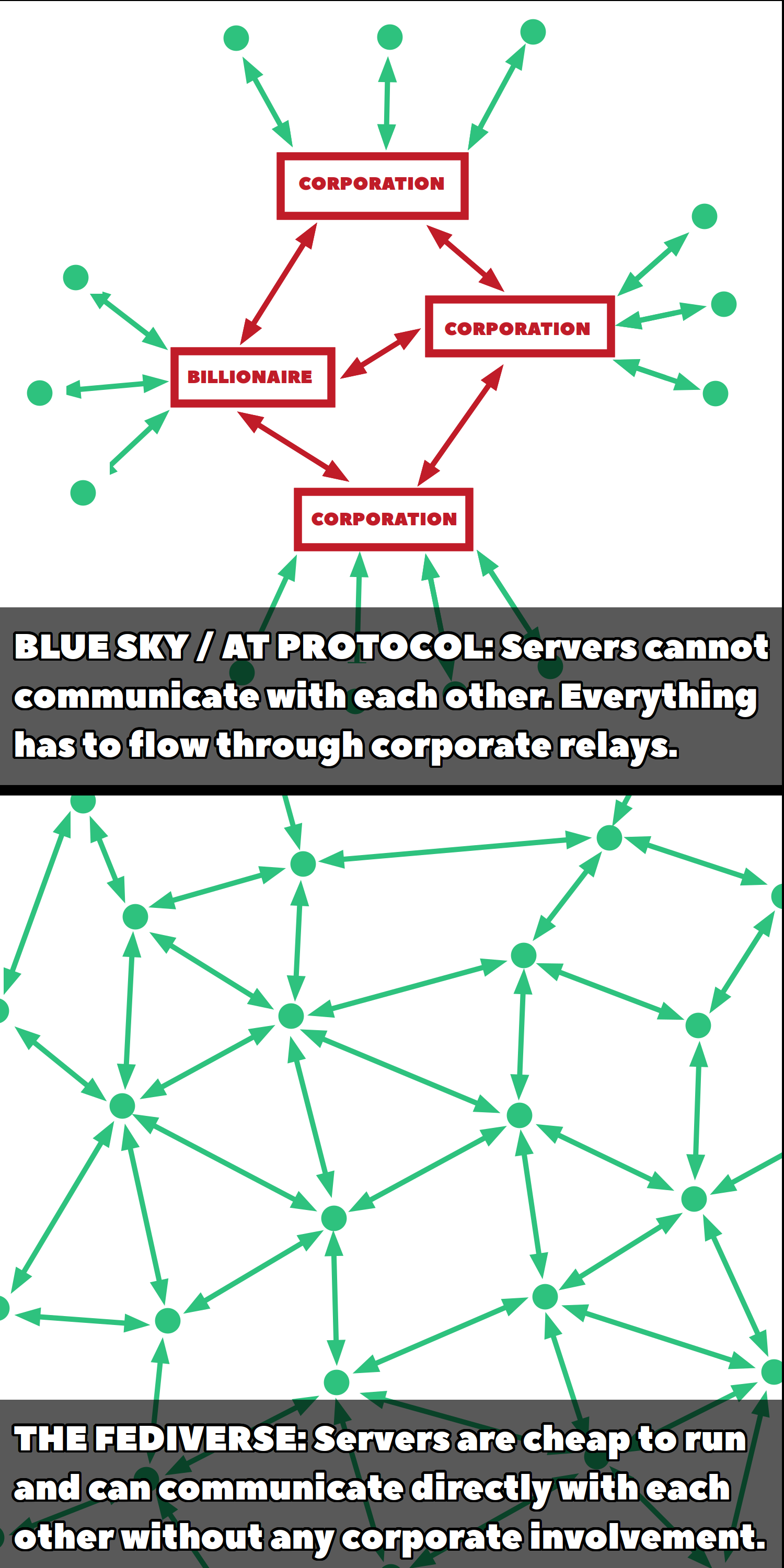
<p>I've had a lot of people ask how BlueSky compares to Mastodon and the Fediverse. I've tried to make the answer as simple and easy to understand as possible: </p><p>🦋 BlueSky is designed to give corporations and wealthy people full control of the network. All of its traffic has to flow through expensive-to-run corporate relays.</p><p><img src="https://neodb.social/media/emoji/social.growyourown.services/Fediverse.png" class="emoji" alt=":Fediverse:" title=":Fediverse:"> The Fediverse is designed to give ordinary people control of the network. All of its traffic flows directly from one cheap-to-run server to another.</p><p><a href="/tags/feditips/" rel="tag">#FediTips</a></p>
Edited 1y ago
<p>There are many post visibility settings on Mastodon:</p><p>🌎 Public - Everyone can see it</p><p>🌘 Unlisted/Quiet Public - Everyone can see it but it won't show up in search results or trends</p><p>🔒 Followers Only - Only your followers can see it</p><p>@ Mentions/Specific People - Only people you mention can see it, often used for DMs</p><p>WARNING: If you mention someone's account (if you @ them), they will be able to see that post on ALL visibilities.</p><p>Lots more info at:</p><p>➡️ <a href="https://fedi.tips/who-can-see-my-posts-in-mastodon-how-do-i-send-dms-in-mastodon" rel="nofollow" class="ellipsis" title="fedi.tips/who-can-see-my-posts-in-mastodon-how-do-i-send-dms-in-mastodon"><span class="invisible">https://</span><span class="ellipsis">fedi.tips/who-can-see-my-posts</span><span class="invisible">-in-mastodon-how-do-i-send-dms-in-mastodon</span></a></p><p><a href="/tags/feditips/" rel="tag">#FediTips</a> <a href="/tags/mastodon/" rel="tag">#Mastodon</a></p>
Edited 1y ago
<p>By request, I've tried to do a guide for organisations that are interested in joining Mastodon and the Fediverse:</p><p>➡️ <a href="https://fedi.tips/tips-for-organisations-on-mastodon-and-the-fediverse" rel="nofollow" class="ellipsis" title="fedi.tips/tips-for-organisations-on-mastodon-and-the-fediverse"><span class="invisible">https://</span><span class="ellipsis">fedi.tips/tips-for-organisatio</span><span class="invisible">ns-on-mastodon-and-the-fediverse</span></a></p><p>Any kind of feedback would be appreciated, especially if you are running an organisation's account.</p><p><a href="/tags/feditips/" rel="tag">#FediTips</a> <a href="/tags/mastodon/" rel="tag">#Mastodon</a> <a href="/tags/fediverse/" rel="tag">#Fediverse</a></p>
<p>Here on the Fediverse, your account's reach depends on your followers rather than your server's size.</p><p>Even if you're on a tiny server, if you have followers from lots of other servers your posts will reach lots of people.</p><p>Here is why: If just *one* person from another server follows you, your posts and account will start showing up on that server and be searchable by *everyone* on that server.</p><p>For tips on making your account more visible, see this guide:</p><p>➡️ <a href="https://fedi.tips/how-do-i-get-more-followers-on-mastodon-and-the-fediverse" rel="nofollow" class="ellipsis" title="fedi.tips/how-do-i-get-more-followers-on-mastodon-and-the-fediverse"><span class="invisible">https://</span><span class="ellipsis">fedi.tips/how-do-i-get-more-fo</span><span class="invisible">llowers-on-mastodon-and-the-fediverse</span></a></p><p><a href="/tags/feditips/" rel="tag">#FediTips</a></p>
<p>You might have noticed that some accounts on here have posts much longer than 500 characters. If you're wondering how this is possible, find out in this guide:</p><p>➡️ <a href="https://fedi.tips/why-do-some-people-on-mastodon-and-the-fediverse-have-bigger-character-limits" rel="nofollow" class="ellipsis" title="fedi.tips/why-do-some-people-on-mastodon-and-the-fediverse-have-bigger-character-limits"><span class="invisible">https://</span><span class="ellipsis">fedi.tips/why-do-some-people-o</span><span class="invisible">n-mastodon-and-the-fediverse-have-bigger-character-limits</span></a></p><p>TL;DR - You need to be on a server that allows larger post sizes, either running a modified version of Mastodon or a totally different kind of Fediverse server.</p><p>You can browse some well-run servers with larger post sizes in the "larger post size" section of fedi.garden:</p><p>➡️ <a href="https://fedi.garden/tag/larger-post-size" rel="nofollow" class="ellipsis" title="fedi.garden/tag/larger-post-size"><span class="invisible">https://</span><span class="ellipsis">fedi.garden/tag/larger-post-si</span><span class="invisible">ze</span></a></p><p><a href="/tags/feditips/" rel="tag">#FediTips</a></p>
<p>One of the nicest things about individual Mastodon servers is they have custom emoji <img src="https://neodb.social/media/emoji/social.growyourown.services/blobcatheart.png" class="emoji" alt=":blobcatheart:" title=":blobcatheart:"> These emoji are visible to other servers so everyone can see them, but only people on a particular server can post them.</p><p>You can access custom emoji by clicking the 🙂 smiley button within the app or web interface. (On mobile apps, the non-custom emoji are accessed by clicking the other smiley button on your phone's keyboard.)</p><p>More info at:</p><p>➡️ <a href="https://fedi.tips/what-are-custom-emoji-how-do-i-access-them-can-i-add-new-ones" rel="nofollow" class="ellipsis" title="fedi.tips/what-are-custom-emoji-how-do-i-access-them-can-i-add-new-ones"><span class="invisible">https://</span><span class="ellipsis">fedi.tips/what-are-custom-emoj</span><span class="invisible">i-how-do-i-access-them-can-i-add-new-ones</span></a></p><p><a href="/tags/feditips/" rel="tag">#FediTips</a> <a href="/tags/mastodon/" rel="tag">#Mastodon</a></p>