<p>La DSpi est une console double écran sous Raspberry Pi CM5<br>Un internaute a créé la DSpi, un nom qui est assez explicite quand on sait qu'il s'agit d'une console de jeu portable..<br> <a href="https://www.minimachines.net/?p=135629" rel="nofollow"><span class="invisible">https://</span>www.minimachines.net/?p=135629</a> <a href="/tags/diy/" rel="tag">#diy</a> <a href="/tags/raspberrypi/" rel="tag">#raspberrypi</a></p>
Raspberry Pi Zero + E-Ink display + battery = portable Mastodon viewer
<small class="notice" x-post-type-data="None">
Takahe has limited support for this type: <a href="https://lemmy.ml/post/19352075">See Original Page</a>
</small>
Edited 1y ago
<p>Update II on my Plan of Execution</p><p>I've had only one system which was up to specs to do the brunt of the work. I've finally also gotten a computer which has EFI.</p><p>It's also older since it has no USB-C however the machine was gifted to me, for which I'm thankful. I need the USB-C though, since important peripherals of mine use that.</p><p>It has proper cooling, as you've read in current posts and I've now also got a Raspberri Pi5 so I can play with electronic projects. Its got Debian Linux on it, and I'm typing this toot on the machine, using a fresh 128GB microSD card.<br>The USB-C port on the SBC seems to be only for power,, since using it as a power pass through does not activate my UCB-C multi function device.</p><p><a href="/tags/hardware/" rel="tag">#Hardware</a> <a href="/tags/success/" rel="tag">#success</a> <a href="/tags/minipc/" rel="tag">#miniPC</a> <a href="/tags/glory/" rel="tag">#glory</a> <a href="/tags/raspberrypi/" rel="tag">#RaspberryPi</a> <a href="/tags/opensource/" rel="tag">#OpenSource</a> <a href="/tags/programming/" rel="tag">#programming</a> <a href="/tags/arm/" rel="tag">#ARM</a></p>
<p>Our Summer Clearance Sale is happening now! Save 50% on select <span class="h-card"><a href="https://hachyderm.io/@adminmagazine" class="u-url mention" rel="nofollow noopener noreferrer" target="_blank">@<span>adminmagazine</span></a></span> and Linux Magazine back issues and products. Use the links at the top of the page to get to the shop system for your region/currency.<br><a href="https://shop.linuxnewmedia.com/shop/category/summer-clearance-79" rel="nofollow" class="ellipsis" title="shop.linuxnewmedia.com/shop/category/summer-clearance-79"><span class="invisible">https://</span><span class="ellipsis">shop.linuxnewmedia.com/shop/ca</span><span class="invisible">tegory/summer-clearance-79</span></a><br><a href="/tags/linux/" rel="tag">#Linux</a> <a href="/tags/sale/" rel="tag">#sale</a> <a href="/tags/libreoffice/" rel="tag">#LibreOffice</a> <a href="/tags/raspberrypi/" rel="tag">#RaspberryPi</a> <a href="/tags/opensource/" rel="tag">#OpenSource</a> <a href="/tags/security/" rel="tag">#security</a> <a href="/tags/hacks/" rel="tag">#hacks</a> <a href="/tags/foss/" rel="tag">#FOSS</a></p>
<p>Have you checked out our Summer Clearance Sale yet? Select back issues and products are 50% off through July 31st! Get 2024 and older issues of Linux Magazine, <span class="h-card"><a href="https://hachyderm.io/@adminmagazine" class="u-url mention" rel="nofollow noopener noreferrer" target="_blank">@<span>adminmagazine</span></a></span>, Special Issues, and select products. Follow the link for the shop for your region/currency.<br><a href="https://shop.linuxnewmedia.com/shop/category/summer-clearance-79" rel="nofollow" class="ellipsis" title="shop.linuxnewmedia.com/shop/category/summer-clearance-79"><span class="invisible">https://</span><span class="ellipsis">shop.linuxnewmedia.com/shop/ca</span><span class="invisible">tegory/summer-clearance-79</span></a><br><a href="/tags/linux/" rel="tag">#Linux</a> <a href="/tags/opensource/" rel="tag">#OpenSource</a> <a href="/tags/security/" rel="tag">#security</a> <a href="/tags/foss/" rel="tag">#FOSS</a> <a href="/tags/libreoffice/" rel="tag">#LibreOffice</a> <a href="/tags/hacks/" rel="tag">#hacks</a> <a href="/tags/raspberrypi/" rel="tag">#RaspberryPi</a></p>
Edited 261d ago
<p>Is your company looking for a keen self-hoster with plenty of <a href="/tags/linux/" rel="tag">#Linux</a> experience? I grew up with <a href="/tags/raspberrypi/" rel="tag">#RaspberryPi</a> and have picked up many skills along the way including <a href="/tags/react/" rel="tag">#React</a>, backend JavaScript (<a href="/tags/nodejs/" rel="tag">#NodeJS</a>) and <a href="/tags/docker/" rel="tag">#Docker</a>. My current obsession is monitoring all the things with <a href="/tags/grafana/" rel="tag">#Grafana</a>, <a href="/tags/prtg/" rel="tag">#PRTG</a> and <a href="/tags/prometheus/" rel="tag">#Prometheus</a>. I’m based in the UK but open to primarily English-speaking roles in Germany, too. Currently wrapping up my Advanced Software Development degree but eager to continue learning! Boosts appreciated :D</p><p><a href="/tags/getfedihired/" rel="tag">#GetFediHired</a></p>
<p>I've got a nerd <a href="/tags/askfedi/" rel="tag">#AskFedi</a> question, expectations are high since we are on the Fediverse 😘</p><p>Situation: I’ve tagged mothers keys with bluetooth trackers. I hate this stuff, but she’s suffering from dementia and I also need some sleep. I'm using android trackers, e.g. the Google Find Hub. I hate this too.<br><a href="/tags/caregiving/" rel="tag">#Caregiving</a> <a href="/tags/alzheimers/" rel="tag">#Alzheimers</a> <a href="/tags/dementia/" rel="tag">#Dementia</a></p><p>Question: How can I improve the bloody “home tracking abilities” of these #%#@! trackers on Google Find network? <br><a href="/tags/bluetooth/" rel="tag">#Bluetooth</a> <a href="/tags/android/" rel="tag">#Android</a> <a href="/tags/raspberrypi/" rel="tag">#RaspberryPi</a> <a href="/tags/fedihelp/" rel="tag">#FediHelp</a></p><p>🧵1/2</p>
Edited 245d ago
<p>Dear fellow or potential fellow gotosocial instance admins,<br>I've come up with a novel way to set up a <a href="/tags/gotosocial/" rel="tag">#gotosocial</a> server behind a reverse proxy, which avoids the use of making new firewalling rules - both on a VPS, and creating port forwarding on one's home router. This method is ideal for minimizing the cost of running one's own <a href="/tags/activitypub/" rel="tag">#ActivityPub</a>/<a href="/tags/mastodon/" rel="tag">#Mastodon</a> server, in a way that leverages inexpensive fast storage on the backend (say, on a <a href="/tags/raspberrypi/" rel="tag">#RaspberryPi</a> 5, 2GB of RAM, with an NVMe). As many valiant and praiseworthy Mastodon server admins might attest to, renting cloud VPS' can cost a lot, especially when storing many tens or hundreds of GB of user data.</p><p>My method avoids the need of forwarding ports 443 and 80 into one's home LAN, using DNAT (on the VPS) and port forwarding (on one's home router). In a nutshell, it's a novel use of <a href="/tags/wireguard/" rel="tag">#Wireguard</a>, in conjunction with <a href="/tags/nginx/" rel="tag">#nginx</a> on the frontend, and gotosocial on the backend. This can save the cost of renting a dedicated VPS, to get the exclusive use of ports 443 and 80, in conjunction with static IPv4 and IPv6 addresses. My method optimizes on reliability and cheapness, but it's not the most secure - decryption and re-encryption happens on the VPS, before the data travels down the Wireguard tunnel. This exposes the data to any underlying hypervisor at one's hosting company. So full disclosure there.</p><p>I've run my method by the helpful gotosocial furries in their <a href="/tags/matrix/" rel="tag">#Matrix</a> Help chatroom (and I'm grateful for their help to debug subtle warts the method had), and got their blessing, at least to the technical soundness of the method.</p><p>I have a testing instance of gotosocial 0.21.0 set up with this new method: <a href="https://g.toque.im" rel="nofollow"><span class="invisible">https://</span>g.toque.im</a></p><p>I'm the user <span class="h-card"><a href="https://g.toque.im/@owl" class="u-url mention" rel="nofollow noopener noreferrer" target="_blank">@<span>owl</span></a></span> on that instance, should you wish to befriend me there.</p><p>I'll make a longer blog post on this in the days to come, and post it in a reply to this post. (I also cross-posted this on another account of mine, please forgive the duplicate: <span class="h-card"><a href="https://wiseowl.club/@gtsadmin" class="u-url mention" rel="nofollow noopener noreferrer" target="_blank">@<span>gtsadmin</span></a></span> )</p><p><a href="/tags/devops/" rel="tag">#DevOps</a> <a href="/tags/linux/" rel="tag">#Linux</a> <a href="/tags/infosec/" rel="tag">#infosec</a> <a href="/tags/selfhosting/" rel="tag">#SelfHosting</a> <a href="/tags/datasovereignty/" rel="tag">#DataSovereignty</a> <a href="/tags/opensource/" rel="tag">#OpenSource</a></p>
Edited 38d ago
<p>Nom de code X1013 : une extension 10 ports USB pour RPi<br>Avec un sens aigu du marketing, le X1013 se positionne comme un hub 10 ports pour cartes de développement Raspberry Pi..<br> <a href="https://www.minimachines.net/?p=138293" rel="nofollow"><span class="invisible">https://</span>www.minimachines.net/?p=138293</a> <a href="/tags/geekworm/" rel="tag">#geekworm</a> <a href="/tags/raspberrypi/" rel="tag">#raspberrypi</a></p>
<p>As I age, I become increasingly cautious about my <a href="/tags/privacy/" rel="tag">#privacy</a>. The slope the world is sliding on is also a big, unfortunate incentive. I have been eying <a href="/tags/pihole/" rel="tag">#PiHole</a> for some time: in this post, I want to explain what it does, how to install it on a <a href="/tags/raspberrypi/" rel="tag">#RaspberryPi</a>, and how to integrate it with <a href="/tags/tailscale/" rel="tag">#Tailscale</a>.</p><p><a href="https://blog.frankel.ch/pi-hole-tailscale/" rel="nofollow" class="ellipsis" title="blog.frankel.ch/pi-hole-tailscale/"><span class="invisible">https://</span><span class="ellipsis">blog.frankel.ch/pi-hole-tailsc</span><span class="invisible">ale/</span></a></p>
Edited 28d ago
<p>Australian software engineer Sarah Spencer hacked a 1980's knitting machine to create "Stargazing: a knitted tapestry" to show the universe in a unique way. 🇦🇺</p><p>Sarah explains, “By using a floppy drive emulator written in Python and a web interface, I can send an image to the Raspberry Pi over the network, preview it in a knitting grid, and tell it to send the knitting pattern to the knitting machine via the floppy drive port ... </p><p><a href="https://magazine.raspberrypi.com/articles/knitting-network-printer" rel="nofollow" class="ellipsis" title="magazine.raspberrypi.com/articles/knitting-network-printer"><span class="invisible">https://</span><span class="ellipsis">magazine.raspberrypi.com/artic</span><span class="invisible">les/knitting-network-printer</span></a></p><p><a href="/tags/womensart/" rel="tag">#WomensArt</a> <a href="/tags/tech/" rel="tag">#Tech</a> <a href="/tags/knitting/" rel="tag">#Knitting</a> <a href="/tags/raspberrypi/" rel="tag">#raspberrypi</a></p>
Edited 187d ago
Humble Tech Book Bundle: Electronics for the Curious<br><br><a href="https://www.humblebundle.com/books/electronics-for-the-curious-no-starch-books" rel="nofollow" class="ellipsis" title="www.humblebundle.com/books/electronics-for-the-curious-no-starch-books"><span class="invisible">https://</span><span class="ellipsis">www.humblebundle.com/books/ele</span><span class="invisible">ctronics-for-the-curious-no-starch-books</span></a><br><br><a href="/tags/raspberrypi/" rel="tag">#RaspberryPi</a> <a href="/tags/arduino/" rel="tag">#Arduino</a> <a href="/tags/electronics/" rel="tag">#Electronics</a> <a href="/tags/diy/" rel="tag">#DIY</a> <a href="/tags/humblebumble/" rel="tag">#HumbleBumble</a><br>
<p>🎥 Homelabbing - na co to komu? Jak serwować swoje usługi zamiast zdawać się na komercyjne chmury.</p><p><span class="h-card"><a href="https://mastodon.com.pl/@stfn" class="u-url mention" rel="nofollow noopener noreferrer" target="_blank">@<span>stfn</span></a></span> opowiada, jak uruchomić na własnym <a href="/tags/raspberrypi/" rel="tag">#RaspberryPi</a> lub starym komputerze domowe centrum danych z wolnym oprogramowaniem, które zastąpi komercyjne, inwazyjne usługi — od prywatnego przechowywania zdjęć po własne repozytoria kodu.</p><p>👉 PeerTube: <a href="https://tube.pol.social/w/w6dxFqFrNeEbfftvpGejL2" rel="nofollow" class="ellipsis" title="tube.pol.social/w/w6dxFqFrNeEbfftvpGejL2"><span class="invisible">https://</span><span class="ellipsis">tube.pol.social/w/w6dxFqFrNeEb</span><span class="invisible">fftvpGejL2</span></a><br>👉 YouTube: <a href="https://youtu.be/Ml6vdiiIGu4" rel="nofollow"><span class="invisible">https://</span>youtu.be/Ml6vdiiIGu4</a></p><p><a href="/tags/piwo/" rel="tag">#piwo</a> <a href="/tags/piwo2025/" rel="tag">#piwo2025</a> <a href="/tags/opensource/" rel="tag">#opensource</a> <a href="/tags/selfhosting/" rel="tag">#selfhosting</a></p>

<p>Assembling a Raspberry Pi Case Made Out of Paper</p><p>Print and assemble an inexpensive Raspberry Pi paper model case that is rigid enough to hold its form while still protecting the device.</p><p><a href="https://www.adamsdesk.com/posts/assemble-raspberry-pi-paper-case/" rel="nofollow" class="ellipsis" title="www.adamsdesk.com/posts/assemble-raspberry-pi-paper-case/"><span class="invisible">https://</span><span class="ellipsis">www.adamsdesk.com/posts/assemb</span><span class="invisible">le-raspberry-pi-paper-case/</span></a></p><p><a href="/tags/blog/" rel="tag">#blog</a> <a href="/tags/raspberrypi/" rel="tag">#RaspberryPi</a> <a href="/tags/case/" rel="tag">#case</a> <a href="/tags/diy/" rel="tag">#DIY</a></p>
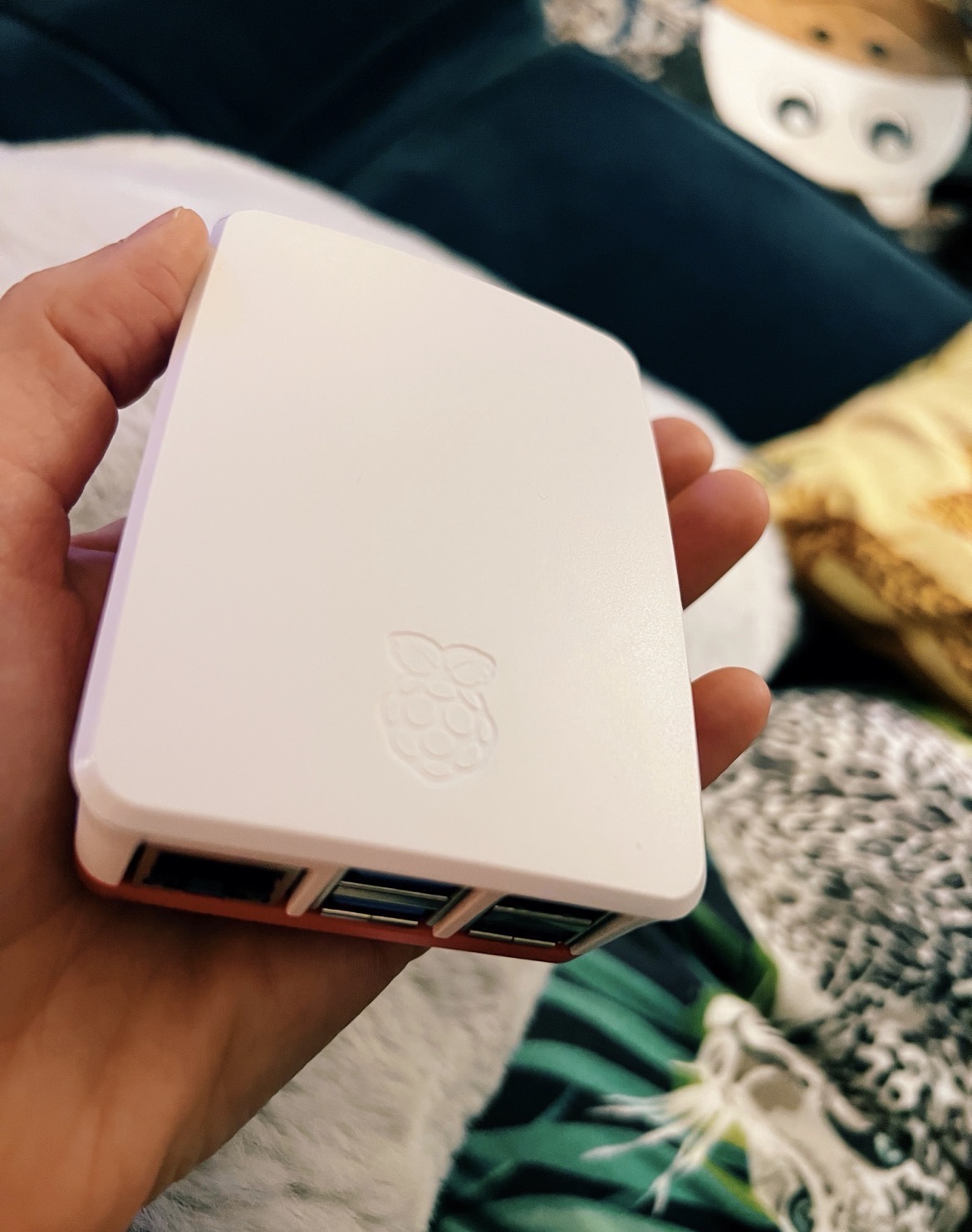
<p>I was trying to show off my darling little Raspi to my extended family but nobody was impressed. So my <a href="/tags/gratefulforyou/" rel="tag">#GratefulForYou</a> nod today goes out to all my Fedi friends who enjoy and delight in this kind of stuff. And thank you for always teaching me new things 🥹</p><p><a href="/tags/linux/" rel="tag">#Linux</a> <a href="/tags/smalltech/" rel="tag">#SmallTech</a> <a href="/tags/raspberrypi/" rel="tag">#RaspberryPi</a></p>
<p>Join <span class="h-card"><a href="https://chaos.social/@ishotjr" class="u-url mention" rel="nofollow noopener noreferrer" target="_blank">@<span>ishotjr</span></a></span> and a panel of special guests as we take a deep dive into the hottest <a href="/tags/embedded/" rel="tag">#embedded</a> <a href="/tags/development/" rel="tag">#development</a> and tiny <a href="/tags/computing/" rel="tag">#computing</a> <a href="/tags/boards/" rel="tag">#boards</a>! From the <a href="/tags/arduino/" rel="tag">#Arduino</a> <a href="/tags/unoq/" rel="tag">#UNOQ</a> to the <a href="/tags/raspberrypi/" rel="tag">#RaspberryPi</a> 500+ and everything in between, we analyze them all. Plus, connect off-grid with <a href="/tags/meshtastic/" rel="tag">#Meshtastic</a>, and knit a <a href="/tags/plushie/" rel="tag">#plushie</a> <a href="/tags/breadboard/" rel="tag">#breadboard</a> that really works! Register now for our Thursday, November 6th V95 <a href="/tags/launchparty/" rel="tag">#LaunchParty</a>! 🥳</p><p><a href="https://makezine.com/article/maker-news/live-make-magazine-volume-95-launch-party/" rel="nofollow" class="ellipsis" title="makezine.com/article/maker-news/live-make-magazine-volume-95-launch-party/"><span class="invisible">https://</span><span class="ellipsis">makezine.com/article/maker-new</span><span class="invisible">s/live-make-magazine-volume-95-launch-party/</span></a></p>
Edited 153d ago
<p>Just shared a new guide! 📸🎥 Learn how to self-host Pixelfed and PeerTube on a Raspberry Pi 5 using an external hard drive and Cloudflare Tunnel for secure access. Own your photos and videos, your way.</p><p>🔗 <a href="https://forum.beitmenotyou.online/t/self-hosting-pixelfed-and-peertube-on-raspberry-pi-5-cloudflare-tunnel-and-an-external-hard-drive/66" rel="nofollow" class="ellipsis" title="forum.beitmenotyou.online/t/self-hosting-pixelfed-and-peertube-on-raspberry-pi-5-cloudflare-tunnel-and-an-external-hard-drive/66"><span class="invisible">https://</span><span class="ellipsis">forum.beitmenotyou.online/t/se</span><span class="invisible">lf-hosting-pixelfed-and-peertube-on-raspberry-pi-5-cloudflare-tunnel-and-an-external-hard-drive/66</span></a></p><p><a href="/tags/selfhosting/" rel="tag">#SelfHosting</a> <a href="/tags/pixelfed/" rel="tag">#Pixelfed</a> <a href="/tags/peertube/" rel="tag">#PeerTube</a> <a href="/tags/raspberrypi/" rel="tag">#RaspberryPi</a></p>
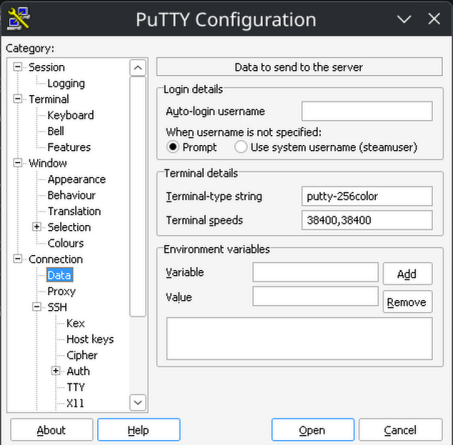
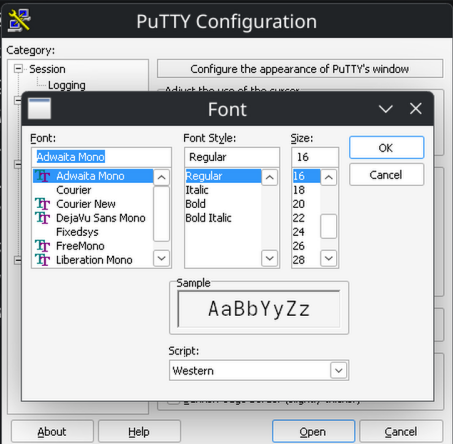
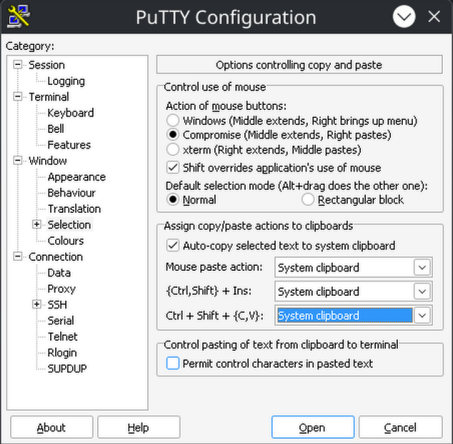
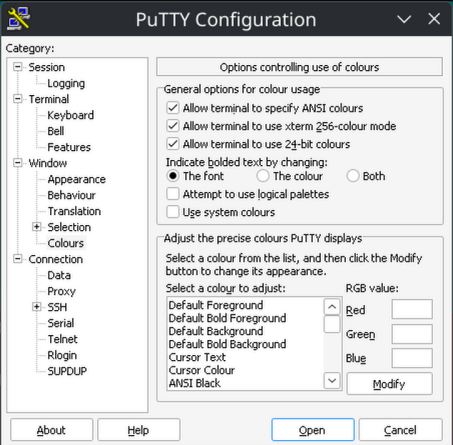
<p><span class="h-card"><a href="https://hachyderm.io/@simontatham" class="u-url mention" rel="nofollow noopener noreferrer" target="_blank">@<span>simontatham</span></a></span> It's been a looong time since I used <a href="/tags/putty/" rel="tag">#putty</a> (I ran it in a <a href="/tags/wine/" rel="tag">#Wine</a> "bottle", these came from <a href="/tags/flatpak/" rel="tag">#flatpak</a>, I'm using Debian 13 <a href="/tags/kde/" rel="tag">#KDE</a>). Thanks for all your efforts!</p><p>To my mind, 98% of the time, people would use putty to log into a <a href="/tags/linux/" rel="tag">#linux</a> box/VPS, like say a <a href="/tags/raspberrypi/" rel="tag">#RaspberryPi</a> (Raspberry Pi OS, is <a href="/tags/debian/" rel="tag">#Debian</a> Trixie 13-based). This would be a sensible default assumption, **demographically**.</p><p>It took a good 2 hours of struggling, just to get 256 colors to work in Putty! (<a href="/tags/python/" rel="tag">#Python</a>'s textualize library seriously expects 256, or *it can crash* when the Theme is changed). Please let the defaults be sane, so there's no struggle for 256 colors! Please alleviate my nerd rage - I beseech you!</p><p>1) Sane TERM env var:<br>Connection -> Data -> Terminal details -> Terminal-type string -> "putty-256color"</p><p>2) Sane default font: <br>Window -> Appearance -> Font settings -> "Change" button -> adwaita mono 12</p><p>3) Sane bolding of text:<br>Window -> Colors -> General options for color usage -> Indicate bolded text by changing: The font</p><p>4) Sane (Linux-terminal-style) Ctrl + Shift + {C,V} (for copy and paste):<br>Window -> Selection -> Assign copy/paste actions to clipboard -> Ctrl + Shift + (C,V}: System Clipboard</p>
Edited 68d ago
Solved
<p>So I have a strange question for the <a href="/tags/linux/" rel="tag">#Linux</a> crowd — or more specifically, for the <a href="/tags/raspberrypi/" rel="tag">#RaspberryPi</a> crowd. And possibly specifically <a href="/tags/raspberrypios/" rel="tag">#RaspberryPiOS</a> (I'm not unwilling to consider others, but it is the most tested and has the tools for managing the RPi stuff.)</p><p>I would like to setup a configuration where the /home partition is encrypted with LUKS. I really would rather only /home for several reasons, including performance. Setting up the encryption is no real issue, but getting it to actually mount it on startup and prompt for the password (no I don't want a keyfile) is a problem. The normal initramfs stuff so easily setup on a desktop system seems to be really hard to get into a RPi distro and guides are way outdated. I can mount after boot, but not during.</p><p>This is a RPi4 (not 5.)</p>
Edited 40d ago
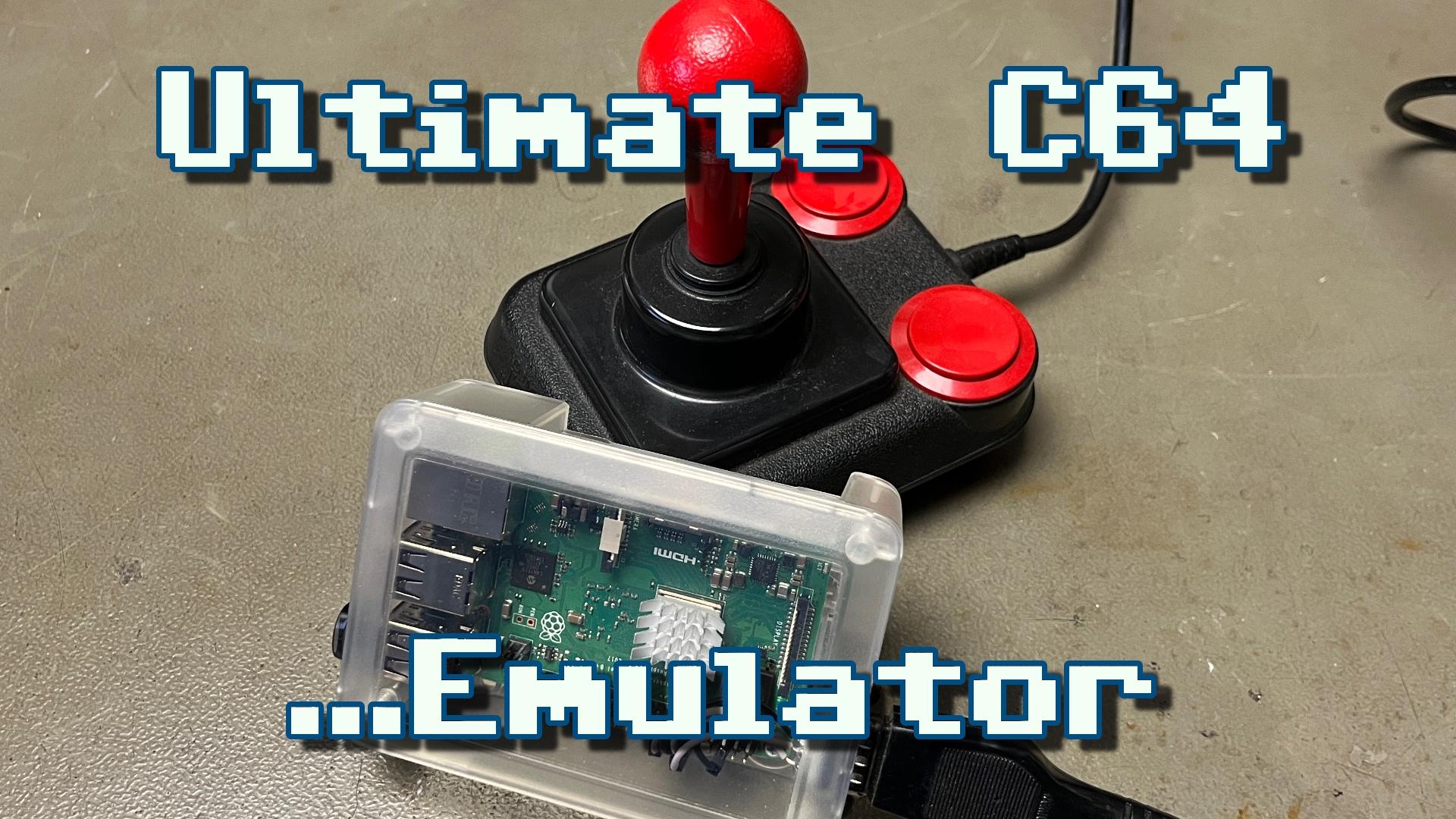
<p>New video! Setting up a BMC64 emulator on a Raspberry Pi with a real joystick port and composite video output for my retro gaming corner.</p><p>YouTube: <a href="https://youtu.be/_AscFowI2pg" rel="nofollow"><span class="invisible">https://</span>youtu.be/_AscFowI2pg</a><br>PeerTube: <a href="https://makertube.net/w/mKwdAeGj2maT6U2bYHejVu" rel="nofollow" class="ellipsis" title="makertube.net/w/mKwdAeGj2maT6U2bYHejVu"><span class="invisible">https://</span><span class="ellipsis">makertube.net/w/mKwdAeGj2maT6U</span><span class="invisible">2bYHejVu</span></a></p><p><a href="/tags/c64/" rel="tag">#C64</a> <a href="/tags/commodore64/" rel="tag">#Commodore64</a> <a href="/tags/commodore/" rel="tag">#Commodore</a> <a href="/tags/c64ultimate/" rel="tag">#C64Ultimate</a> <a href="/tags/c64mini/" rel="tag">#C64Mini</a> <a href="/tags/c64maxi/" rel="tag">#C64Maxi</a> <a href="/tags/emulator/" rel="tag">#Emulator</a> <a href="/tags/vice/" rel="tag">#VICE</a> <a href="/tags/bmc64/" rel="tag">#BMC64</a> <a href="/tags/joystick/" rel="tag">#Joystick</a> <a href="/tags/composite/" rel="tag">#Composite</a> <a href="/tags/crt/" rel="tag">#CRT</a> <a href="/tags/raspberrypi/" rel="tag">#RaspberryPi</a></p>
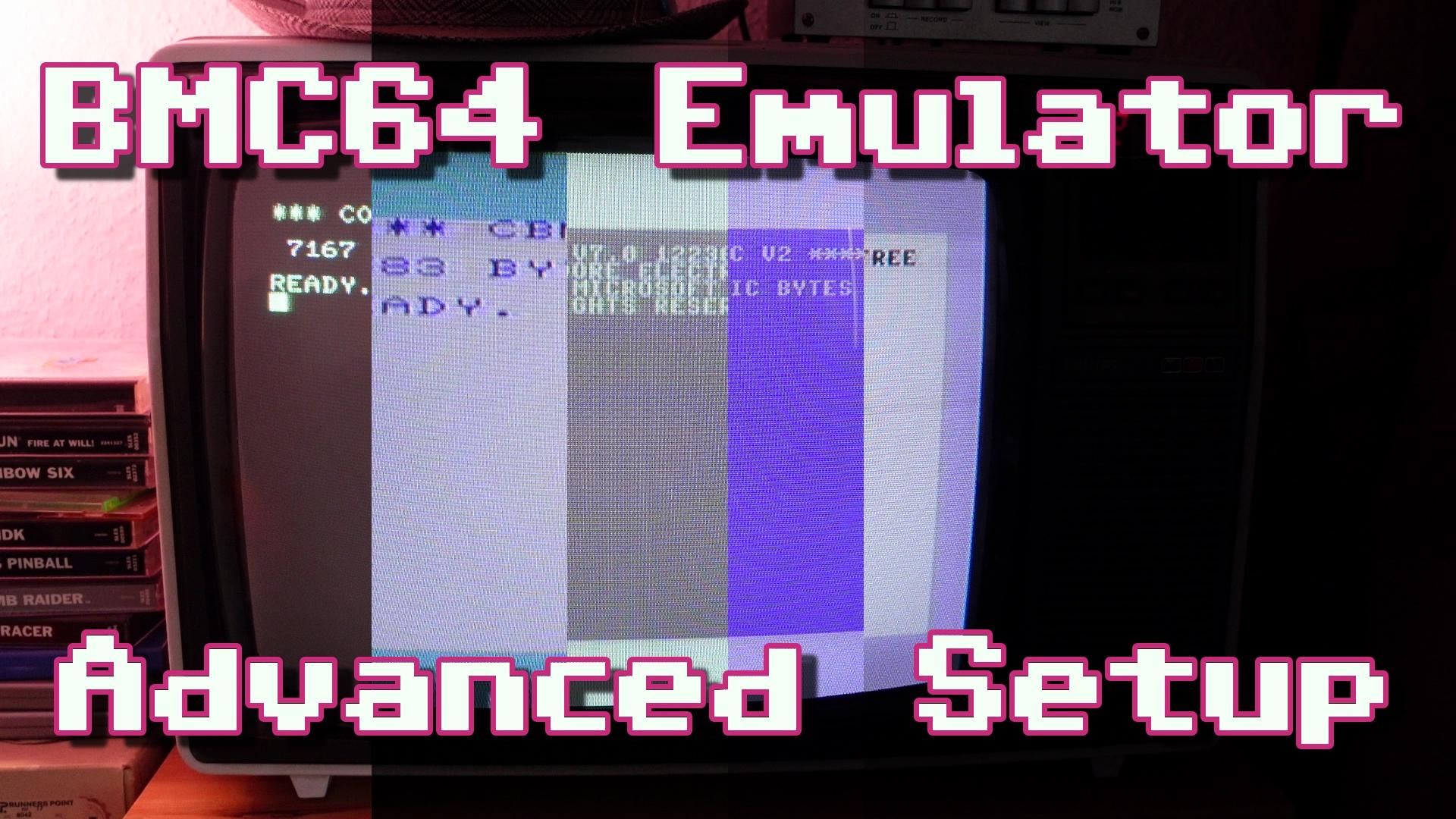
<p>New video! Digging a bit deeper into the settings of the BMC64 emulator, installing all emulated systems and even getting autofire joysticks to work.</p><p>YouTube: <a href="https://youtu.be/m3RKBWSEvdU" rel="nofollow"><span class="invisible">https://</span>youtu.be/m3RKBWSEvdU</a><br>PeerTube: <a href="https://makertube.net/w/tVY7GrYMV8DH1HAUbuHKXd" rel="nofollow" class="ellipsis" title="makertube.net/w/tVY7GrYMV8DH1HAUbuHKXd"><span class="invisible">https://</span><span class="ellipsis">makertube.net/w/tVY7GrYMV8DH1H</span><span class="invisible">AUbuHKXd</span></a></p><p><a href="/tags/c64/" rel="tag">#C64</a> <a href="/tags/commodore64/" rel="tag">#Commodore64</a> <a href="/tags/commodore/" rel="tag">#Commodore</a> <a href="/tags/c64ultimate/" rel="tag">#C64Ultimate</a> <a href="/tags/c64mini/" rel="tag">#C64Mini</a> <a href="/tags/c64maxi/" rel="tag">#C64Maxi</a> <a href="/tags/emulator/" rel="tag">#Emulator</a> <a href="/tags/vice/" rel="tag">#VICE</a> <a href="/tags/bmc64/" rel="tag">#BMC64</a> <a href="/tags/joystick/" rel="tag">#Joystick</a> <a href="/tags/composite/" rel="tag">#Composite</a> <a href="/tags/crt/" rel="tag">#CRT</a> <a href="/tags/raspberrypi/" rel="tag">#RaspberryPi</a></p>
<p>"If you want to be in the Fediverse without relying on big intances, or if you just want to own your <a href="/tags/data/" rel="tag">#data</a> & <a href="/tags/identity/" rel="tag">#identity</a> on the network, running your own instance is the way to go.<br>That is where Mastodon alternatives such as GoToSocial & <a href="/tags/snac/" rel="tag">#snac</a> comes in.<br>snac (Social Networks Are Crap) is a minimalistic, lightweight <a href="/tags/activitypub/" rel="tag">#ActivityPub</a> instance…perfect for single user instances or small communities, and it's so light that even a <a href="/tags/raspberrypi/" rel="tag">#RaspberryPi</a> can handle it without breaking a sweat."<br><a href="https://rochacbruno.com/deploy-your-own-fediverse-instance-with-snac.html" rel="nofollow" class="ellipsis" title="rochacbruno.com/deploy-your-own-fediverse-instance-with-snac.html"><span class="invisible">https://</span><span class="ellipsis">rochacbruno.com/deploy-your-ow</span><span class="invisible">n-fediverse-instance-with-snac.html</span></a></p>













 🇪🇺
🇪🇺