<p>BookWyrm is a social network for people who enjoy books and reading. It's intended as a Fediverse alternative to Amazon's Goodreads. The official site is at:</p><p>📚 <a href="https://joinbookwyrm.com" rel="nofollow"><span class="invisible">https://</span>joinbookwyrm.com</a></p><p>There's a FediTips guide all about BookWyrm with lots of questions answered at:</p><p>➡️ <a href="https://fedi.tips/bookwyrm-a-social-network-for-people-who-enjoy-reading" rel="nofollow" class="ellipsis" title="fedi.tips/bookwyrm-a-social-network-for-people-who-enjoy-reading"><span class="invisible">https://</span><span class="ellipsis">fedi.tips/bookwyrm-a-social-ne</span><span class="invisible">twork-for-people-who-enjoy-reading</span></a></p><p>BookWyrm accounts can be followed from Mastodon etc. However, you need to sign up for an account on a BookWyrm server if you want to use BookWyrm's features.</p><p><a href="/tags/feditips/" rel="tag">#FediTips</a> <a href="/tags/bookwyrm/" rel="tag">#BookWyrm</a> <a href="/tags/goodreads/" rel="tag">#GoodReads</a> <a href="/tags/alternatives/" rel="tag">#Alternatives</a></p>
feditips
<p>One of the most overlooked but useful features on Mastodon is "Notes". These let you add private info to profiles which only you can see:</p><p>➡️ <a href="https://fedi.tips/what-are-notes-on-mastodon-what-does-click-to-add-note-mean-on-mastodon-profiles" rel="nofollow" class="ellipsis" title="fedi.tips/what-are-notes-on-mastodon-what-does-click-to-add-note-mean-on-mastodon-profiles"><span class="invisible">https://</span><span class="ellipsis">fedi.tips/what-are-notes-on-ma</span><span class="invisible">stodon-what-does-click-to-add-note-mean-on-mastodon-profiles</span></a></p><p>A lot of people use notes for keeping track of why they blocked or muted someone, but there are also lots of other purposes.</p><p>Notes can be created on the web interface and some third party apps. Just click on the "Add note" section of a profile and type what you want.</p><p><a href="/tags/feditips/" rel="tag">#FediTips</a> <a href="/tags/mastodon/" rel="tag">#Mastodon</a> <a href="/tags/notes/" rel="tag">#Notes</a></p>
Edited 1y ago
<p>If you want to, you can set your Mastodon account into follow request mode, so that any follows you get from other people have to be manually approved by you. Here's how to do it:</p><p>➡️ <a href="https://fedi.tips/restricting-who-can-follow-you-in-mastodon" rel="nofollow" class="ellipsis" title="fedi.tips/restricting-who-can-follow-you-in-mastodon"><span class="invisible">https://</span><span class="ellipsis">fedi.tips/restricting-who-can-</span><span class="invisible">follow-you-in-mastodon</span></a></p><p>When you do this, a little padlock 🔒 will appear on your profile.</p><p>When you receive a follow request, your server website or app will let you know and you can click ✔️ or ❌ depending on whether you approve or deny the request.</p><p><a href="/tags/feditips/" rel="tag">#FediTips</a> <a href="/tags/mastodon/" rel="tag">#Mastodon</a></p>
<p>If you block a server using the "domain block" feature on Mastodon, this will cause you to lose any follows or followers you have on that server. The exact number of follows/followers you would lose are shown at the top of the warning when you do the block.</p><p>However, if you have done the block accidentally or if you have changed your mind about the block, here is a guide to how you can unblock the server and restore your follows and followers:</p><p>➡️ <a href="https://fedi.tips/help-ive-accidentally-blocked-a-server-on-mastodon-what-do-i-do-now" rel="nofollow" class="ellipsis" title="fedi.tips/help-ive-accidentally-blocked-a-server-on-mastodon-what-do-i-do-now"><span class="invisible">https://</span><span class="ellipsis">fedi.tips/help-ive-accidentall</span><span class="invisible">y-blocked-a-server-on-mastodon-what-do-i-do-now</span></a></p><p><a href="/tags/feditips/" rel="tag">#FediTips</a> <a href="/tags/mastodon/" rel="tag">#Mastodon</a></p>
<p>You can optionally set Mastodon to ignore any DMs from accounts you don't follow:</p><p>1. Log onto your server’s website or web app<br>2. Click 🔔 Notifications<br>3. Click ⚙️ in top right corner of the Notifications section<br>4. In "Unsolicited private mentions" click the dropdown menu and select "Ignore"<br>5. When the confirmation box appears, click "Ignore notifications"</p><p>If you activate this, you may want to mention it in your profile so people realise their DMs won't get to you.</p><p><a href="/tags/feditips/" rel="tag">#FediTips</a> <a href="/tags/mastodon/" rel="tag">#Mastodon</a></p>
<p>If you have a public Mastodon account and want to reach the widest possible audience, you should opt into the full text search system:</p><p>1. Log into your server’s website<br>2. Go to your profile<br>3. Click "Edit Profile"<br>4. Click on "Privacy & Reach" tab at the top<br>5. Scroll down to section marked "Search"<br>6. Tick box marked "Include public posts in search results"<br>7. Click "Save Changes" button at bottom of the screen</p><p>Lots more info and questions answered at:</p><p>➡️ <a href="https://fedi.tips/how-do-i-opt-into-or-out-of-full-text-search-on-mastodon" rel="nofollow" class="ellipsis" title="fedi.tips/how-do-i-opt-into-or-out-of-full-text-search-on-mastodon"><span class="invisible">https://</span><span class="ellipsis">fedi.tips/how-do-i-opt-into-or</span><span class="invisible">-out-of-full-text-search-on-mastodon</span></a></p><p><a href="/tags/feditips/" rel="tag">#FediTips</a></p>
Edited 361d ago
<p>If you want to add extra security to your Mastodon account, you can optionally use "Two-Factor Authentication" (2FA). When you have this feature activated, even if someone else finds out your password they will be unable to log into your account.</p><p>There is a complete guide to activating 2FA on Mastodon here:</p><p>➡️ <a href="https://fedi.tips/using-two-factor-authentication-2fa-on-mastodon" rel="nofollow" class="ellipsis" title="fedi.tips/using-two-factor-authentication-2fa-on-mastodon"><span class="invisible">https://</span><span class="ellipsis">fedi.tips/using-two-factor-aut</span><span class="invisible">hentication-2fa-on-mastodon</span></a></p><p>This guide also answers lots of common questions about two-factor authentication 🙂 </p><p><a href="/tags/feditips/" rel="tag">#FediTips</a> <a href="/tags/mastodon/" rel="tag">#Mastodon</a> <a href="/tags/2fa/" rel="tag">#2FA</a> <a href="/tags/twofactorauthentication/" rel="tag">#TwoFactorAuthentication</a></p>
<p>Mastodon has a built-in translation system for posts in other languages. For it to work, three things have to happen:</p><p> - Your server has to offer the service<br> - Your language settings have to be correct<br> - The person posting has to use the correct language settings</p><p>If all these are ok, you will see a "Translate" link below the post or in the post's ⋯ menu when you encounter a post in a foreign language.</p><p>Lots more info and questions answered at:</p><p>➡️ <a href="https://fedi.tips/is-there-a-built-in-language-translation-system-on-mastodon" rel="nofollow" class="ellipsis" title="fedi.tips/is-there-a-built-in-language-translation-system-on-mastodon"><span class="invisible">https://</span><span class="ellipsis">fedi.tips/is-there-a-built-in-</span><span class="invisible">language-translation-system-on-mastodon</span></a></p><p><a href="/tags/feditips/" rel="tag">#FediTips</a> <a href="/tags/mastodon/" rel="tag">#Mastodon</a></p>
<p>If you're using Mastodon through your server's website on a computer, you can type emoji directly:</p><p>1. Type a colon : and without a space start typing a keyword, this opens a popup<br>2. Select the emoji you want with the arrow keys and press enter<br>3. If the one you want isn't there, click the 🙂 icon at the bottom of the post-writing box to open the full picker</p><p>The keyword results are partly based on alt-text names of emoji. Hover over an emoji in the picker to see its name.</p><p><a href="/tags/feditips/" rel="tag">#FediTips</a> <a href="/tags/mastodon/" rel="tag">#Mastodon</a></p>
Edited 353d ago
<p>Here's how to see trending posts, hashtags and news stories on your server:</p><p> - On the official app, click the 🔍 magnifying glass at the bottom but leave the search box blank. Select a trend tab at the top.</p><p> - On the website, click 🧭 Explore at the right of the screen, then select the tab you want.</p><p> - Third party apps have various interfaces, usually with the word "Trending".</p><p>Lots more info and questions answered about Mastodon trends here:</p><p>➡️ <a href="https://fedi.tips/where-are-the-trending-posts-and-hashtags-on-mastodon" rel="nofollow" class="ellipsis" title="fedi.tips/where-are-the-trending-posts-and-hashtags-on-mastodon"><span class="invisible">https://</span><span class="ellipsis">fedi.tips/where-are-the-trendi</span><span class="invisible">ng-posts-and-hashtags-on-mastodon</span></a></p><p><a href="/tags/feditips/" rel="tag">#FediTips</a> <a href="/tags/mastodon/" rel="tag">#Mastodon</a></p>
Edited 352d ago
<p>It's really important to add text descriptions when you're posting images, video or audio files. However, it's not always easy to remember to do it, so there is a special account which reminds you if you forget:</p><p>➡️ <span class="h-card"><a href="https://hachyderm.io/@PleaseCaptionBot" class="u-url mention" rel="nofollow noopener noreferrer" target="_blank">@<span>PleaseCaptionBot</span></a></span> </p><p>Just follow the account, and it will follow you back and DM you if you post something without a description.</p><p>To stop getting reminders, unfollow the account, then block and unblock it so that it unfollows you.</p><p>More info at: <a href="https://fedi.tips/how-do-i-remember-to-add-text-descriptions-on-mastodon-and-the-fediverse" rel="nofollow" class="ellipsis" title="fedi.tips/how-do-i-remember-to-add-text-descriptions-on-mastodon-and-the-fediverse"><span class="invisible">https://</span><span class="ellipsis">fedi.tips/how-do-i-remember-to</span><span class="invisible">-add-text-descriptions-on-mastodon-and-the-fediverse</span></a></p><p><a href="/tags/feditips/" rel="tag">#FediTips</a></p>
<p>im the worlds most annoying dog</p><p><a href="/tags/feditips/" rel="tag">#feditips</a></p>
<p>How to send a DM on Mastodon:</p><p>1. Start a new post<br>2. Set post visibility to "Mentions" or "Private Mentions" or "Only people I mention" or "Specific people" (phrase depends on which app or interface you're using)<br>3. Mention account addresses of people you want to DM<br>4. Write the DM<br>5. Post it</p><p>NOTE: Like most social networks Mastodon DMs aren't end-to-end encrypted, so you should not use them for sensitive info.</p><p>More about post visibilities at:</p><p>➡️ <a href="https://fedi.tips/who-can-see-my-posts-in-mastodon-how-do-i-send-dms-in-mastodon" rel="nofollow" class="ellipsis" title="fedi.tips/who-can-see-my-posts-in-mastodon-how-do-i-send-dms-in-mastodon"><span class="invisible">https://</span><span class="ellipsis">fedi.tips/who-can-see-my-posts</span><span class="invisible">-in-mastodon-how-do-i-send-dms-in-mastodon</span></a></p><p><a href="/tags/feditips/" rel="tag">#FediTips</a> <a href="/tags/mastodon/" rel="tag">#Mastodon</a></p>
Edited 218d ago
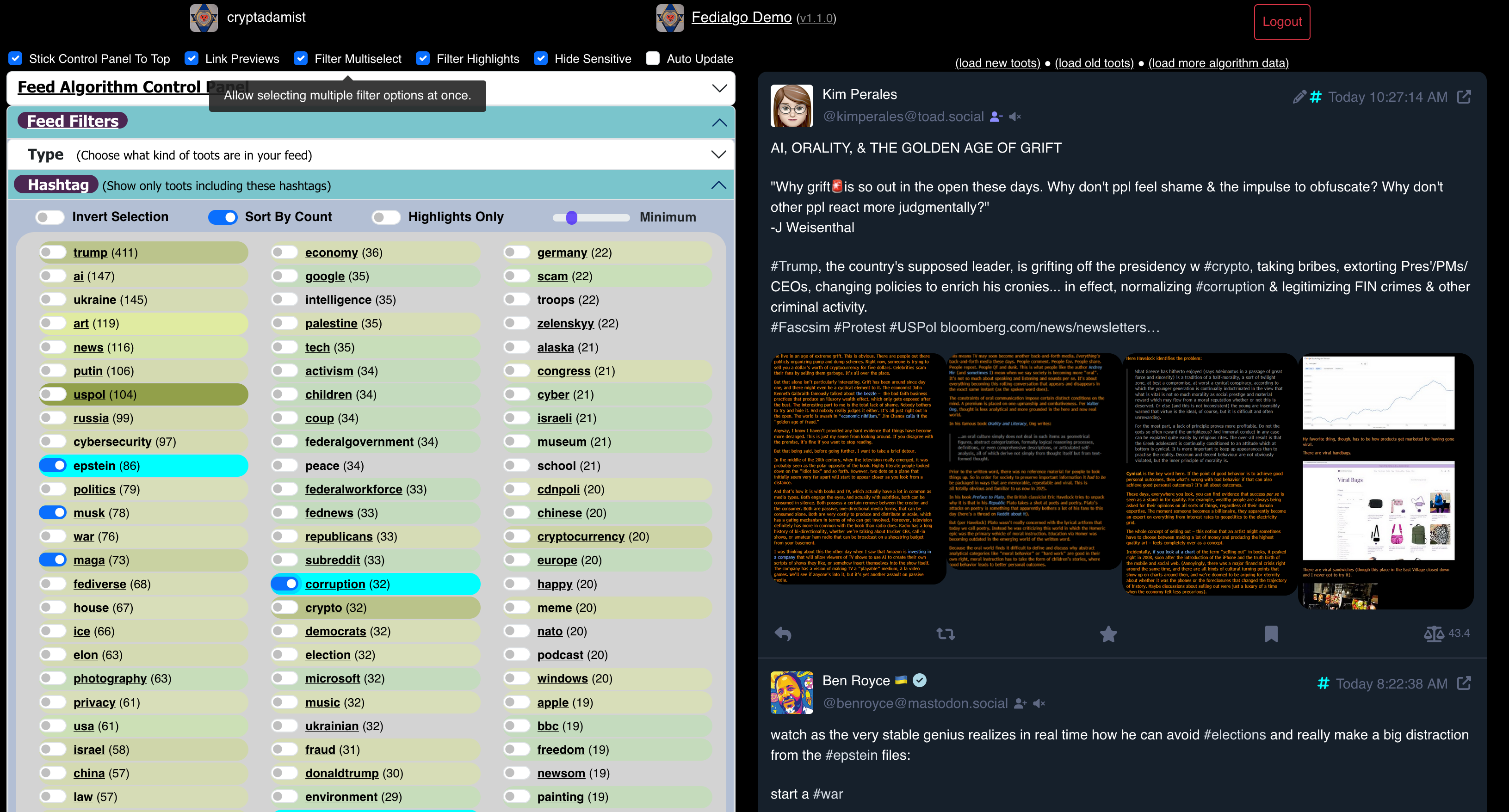
<p>Ω🪬Ω<br><a href="/tags/fedialgo/" rel="tag">#FediAlgo</a> v1.1.19 is deployed. Minor bugfixes and improvements to the customizable timeline algorithm / filtering system for your Mastodon feed.</p><p>* Link: <a href="https://michelcrypt4d4mus.github.io/fedialgo_demo_app_foryoufeed/" rel="nofollow" class="ellipsis" title="michelcrypt4d4mus.github.io/fedialgo_demo_app_foryoufeed/"><span class="invisible">https://</span><span class="ellipsis">michelcrypt4d4mus.github.io/fe</span><span class="invisible">dialgo_demo_app_foryoufeed/</span></a><br>* Code: <a href="https://github.com/michelcrypt4d4mus/fedialgo_demo_app_foryoufeed" rel="nofollow" class="ellipsis" title="github.com/michelcrypt4d4mus/fedialgo_demo_app_foryoufeed"><span class="invisible">https://</span><span class="ellipsis">github.com/michelcrypt4d4mus/f</span><span class="invisible">edialgo_demo_app_foryoufeed</span></a><br>* Video of FediAlgo in action (slightly out of date): <a href="https://universeodon.com/@cryptadamist/114395249311910522" rel="nofollow" class="ellipsis" title="universeodon.com/@cryptadamist/114395249311910522"><span class="invisible">https://</span><span class="ellipsis">universeodon.com/@cryptadamist</span><span class="invisible">/114395249311910522</span></a></p><p><a href="/tags/activitypub/" rel="tag">#activitypub</a> <a href="/tags/algorithm/" rel="tag">#algorithm</a> <a href="/tags/algorithmicfeed/" rel="tag">#algorithmicFeed</a> <a href="/tags/algorithmictimeline/" rel="tag">#algorithmicTimeline</a> <a href="/tags/fedi/" rel="tag">#Fedi</a> <a href="/tags/feditips/" rel="tag">#FediTips</a> <a href="/tags/feditools/" rel="tag">#FediTools</a> <a href="/tags/fediverse/" rel="tag">#Fediverse</a> <a href="/tags/feed/" rel="tag">#Feed</a> <a href="/tags/foss/" rel="tag">#FOSS</a> <a href="/tags/gotosocial/" rel="tag">#GoToSocial</a> <a href="/tags/hashtag/" rel="tag">#hashtag</a> <a href="/tags/hashtags/" rel="tag">#hashtags</a> <a href="/tags/mastoadmin/" rel="tag">#MastoAdmin</a> <a href="/tags/mastodon/" rel="tag">#Mastodon</a> <a href="/tags/mastodonapi/" rel="tag">#MastodonApi</a> <a href="/tags/mastohelp/" rel="tag">#mastohelp</a> <a href="/tags/mastojs/" rel="tag">#mastojs</a> <a href="/tags/nodejs/" rel="tag">#nodejs</a> <a href="/tags/nod/" rel="tag">#nod</a> <a href="/tags/opensource/" rel="tag">#opensource</a> <a href="/tags/socialmedia/" rel="tag">#socialmedia</a> <a href="/tags/socialweb/" rel="tag">#SocialWeb</a> <a href="/tags/timeline/" rel="tag">#timeline</a> <a href="/tags/tl/" rel="tag">#TL</a> <a href="/tags/typescript/" rel="tag">#typescript</a> <a href="/tags/webdev/" rel="tag">#webdev</a></p>
<p>I created a Mastodon "how to" page on our family Wordpress site: <a href="https://txcolliers.net/wordpress/mastodon-feed/" rel="nofollow" class="ellipsis" title="txcolliers.net/wordpress/mastodon-feed/"><span class="invisible">https://</span><span class="ellipsis">txcolliers.net/wordpress/masto</span><span class="invisible">don-feed/</span></a> It's targeted toward our family and friends who may or may not have heard of Mastodon, but don't have any idea of how to get started. (And it was an opportunity to learn how to embed a feed in a Wordpress page!)</p><p><a href="/tags/mastodontips/" rel="tag">#MastodonTips</a> <a href="/tags/feditips/" rel="tag">#FediTips</a> <a href="/tags/gettingstarted/" rel="tag">#GettingStarted</a></p>
<p>There is a Fediverse alternative to <a href="/tags/substack/" rel="tag">#Substack</a> called <a href="/tags/ghost/" rel="tag">#Ghost</a>. </p><p>Ghost is now compatible with the Fediverse. It's not just a feed, Ghost-powered sites can take part in discussions with Mastodon etc accounts, the follows work in both directions etc.</p><p>There's a guide to using Ghost-powered sites on the Fediverse here:</p><p>➡️ <a href="https://fedi.tips/how-to-use-the-fediverse-on-your-ghost-powered-site" rel="nofollow" class="ellipsis" title="fedi.tips/how-to-use-the-fediverse-on-your-ghost-powered-site"><span class="invisible">https://</span><span class="ellipsis">fedi.tips/how-to-use-the-fediv</span><span class="invisible">erse-on-your-ghost-powered-site</span></a></p><p>Some Ghost-powered sites to follow at:</p><p>➡️ <a href="https://fedi.directory/tag/ghost" rel="nofollow"><span class="invisible">https://</span>fedi.directory/tag/ghost</a></p><p>(Copy-paste an address into the search box in Mastodon to follow.)</p><p><a href="/tags/feditips/" rel="tag">#FediTips</a> <a href="/tags/fediverse/" rel="tag">#Fediverse</a></p>
<p>In case you missed it, the Fedi.Garden website is now designed to make it as easy as possible to choose a reliable server on Mastodon and the wider Fediverse:</p><p><img src="https://neodb.social/media/emoji/social.growyourown.services/Fediverse.png" class="emoji" alt=":Fediverse:" title=":Fediverse:"> <a href="https://fedi.garden" rel="nofollow"><span class="invisible">https://</span>fedi.garden</a></p><p>The new design takes people to a selection that they feel comfortable with:</p><p>- If you find choice overwhelming, it shows you one good general server (which is regularly rotated to spread the growth)</p><p>- If you enjoy choice, it shows the full directory of good servers sorted into categories</p><p><a href="/tags/feditips/" rel="tag">#FediTips</a></p>
<p>If you're lonely or isolated or finding the Christmas period difficult for any reason, you might want to follow the hashtag <a href="/tags/joinin/" rel="tag">#JoinIn</a> and follow the group !<span class="h-card"><a href="https://fedigroups.social/@joinin" class="u-url mention" rel="nofollow noopener noreferrer" target="_blank">@<span>joinin</span></a></span> </p><p>These are intended for people to start friendly chats about everyday stuff they're doing like making food, going for walks, listening to music etc.</p><p>It's fine to reply to posts with the JoinIn tag or in the JoinIn group, as the person who made the post is actively seeking conversation 🙂 </p><p><a href="/tags/feditips/" rel="tag">#FediTips</a> <a href="/tags/christmas/" rel="tag">#Christmas</a> <a href="/tags/xmas/" rel="tag">#Xmas</a></p>
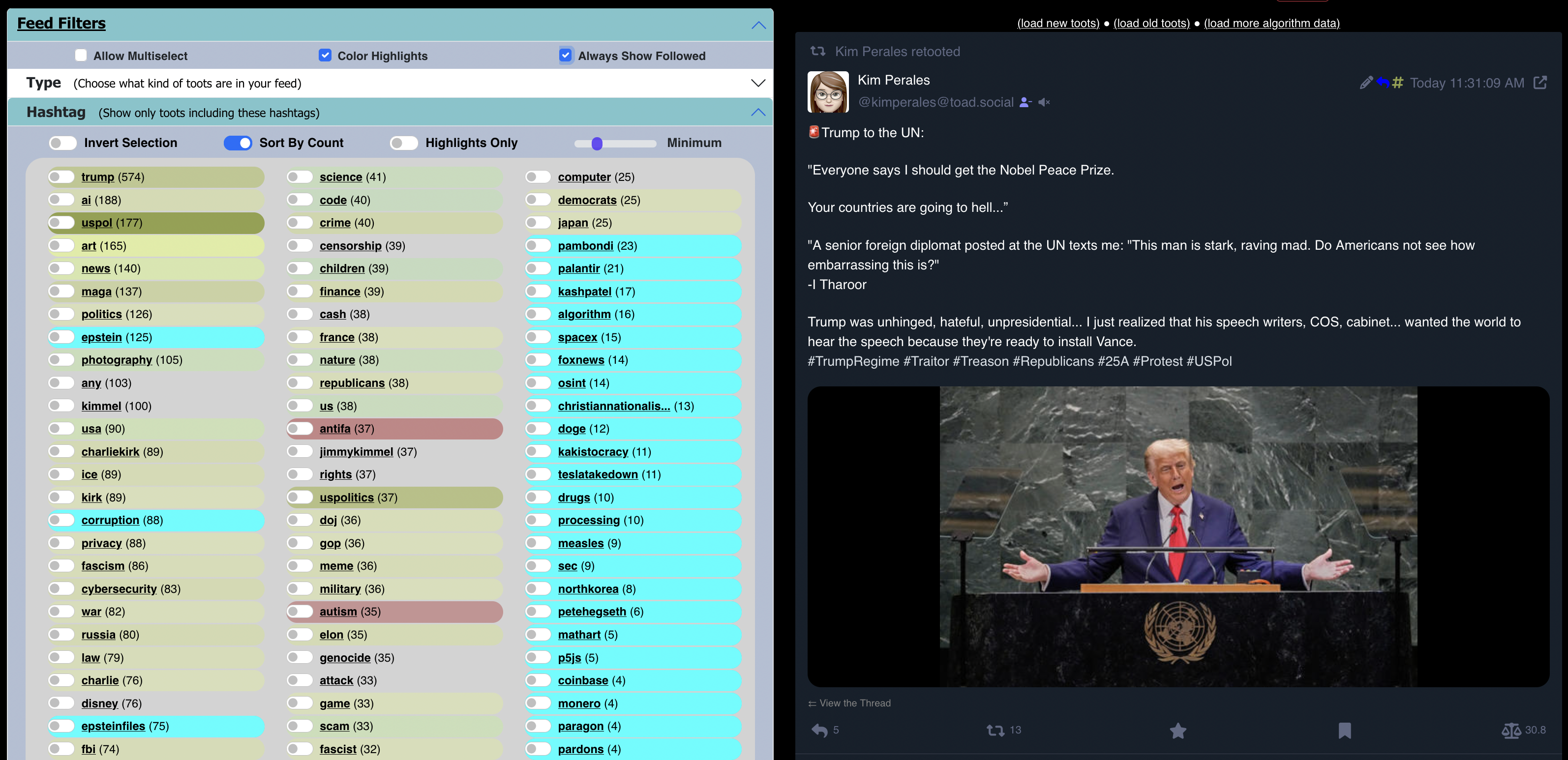
<p>Ω🪬Ω<br><a href="/tags/fedialgo/" rel="tag">#FediAlgo</a> (the customizable timeline algorithm / filtering system for your Mastodon feed) v1.2.2 is deployed now. Has a switch that makes sure any <a href="/tags/hashtags/" rel="tag">#hashtags</a> / users / etc. that you follow are displayed as filter options even if they don't meet the minimum number of recent toots threshold.</p><p>Also a bunch of bug fixes and small improvements.</p><p>* Try it here: <a href="https://michelcrypt4d4mus.github.io/fedialgo_demo_app_foryoufeed/" rel="nofollow" class="ellipsis" title="michelcrypt4d4mus.github.io/fedialgo_demo_app_foryoufeed/"><span class="invisible">https://</span><span class="ellipsis">michelcrypt4d4mus.github.io/fe</span><span class="invisible">dialgo_demo_app_foryoufeed/</span></a><br>* Code: <a href="https://github.com/michelcrypt4d4mus/fedialgo_demo_app_foryoufeed" rel="nofollow" class="ellipsis" title="github.com/michelcrypt4d4mus/fedialgo_demo_app_foryoufeed"><span class="invisible">https://</span><span class="ellipsis">github.com/michelcrypt4d4mus/f</span><span class="invisible">edialgo_demo_app_foryoufeed</span></a><br>* Video of FediAlgo in action (slightly outdated): <a href="https://universeodon.com/@cryptadamist/114395249311910522" rel="nofollow" class="ellipsis" title="universeodon.com/@cryptadamist/114395249311910522"><span class="invisible">https://</span><span class="ellipsis">universeodon.com/@cryptadamist</span><span class="invisible">/114395249311910522</span></a></p><p><a href="/tags/activitypub/" rel="tag">#activitypub</a> <a href="/tags/algorithm/" rel="tag">#algorithm</a> <a href="/tags/algorithmicfeed/" rel="tag">#algorithmicFeed</a> <a href="/tags/algorithmictimeline/" rel="tag">#algorithmicTimeline</a> <a href="/tags/fedi/" rel="tag">#Fedi</a> <a href="/tags/feditips/" rel="tag">#FediTips</a> <a href="/tags/feditools/" rel="tag">#FediTools</a> <a href="/tags/fediverse/" rel="tag">#Fediverse</a> <a href="/tags/feed/" rel="tag">#Feed</a> <a href="/tags/foss/" rel="tag">#FOSS</a> <a href="/tags/gotosocial/" rel="tag">#GoToSocial</a> <a href="/tags/hashtag/" rel="tag">#hashtag</a> <a href="/tags/hashtags/" rel="tag">#hashtags</a> <a href="/tags/javascript/" rel="tag">#javascript</a> <a href="/tags/mastoadmin/" rel="tag">#MastoAdmin</a> <a href="/tags/mastodon/" rel="tag">#Mastodon</a> <a href="/tags/mastodonapi/" rel="tag">#MastodonApi</a> <a href="/tags/mastohelp/" rel="tag">#mastohelp</a> <a href="/tags/mastojs/" rel="tag">#mastojs</a> <a href="/tags/node/" rel="tag">#node</a> <a href="/tags/nodejs/" rel="tag">#nodejs</a> <a href="/tags/opensource/" rel="tag">#opensource</a> <a href="/tags/socialmedia/" rel="tag">#socialmedia</a> <a href="/tags/socialweb/" rel="tag">#SocialWeb</a> <a href="/tags/timeline/" rel="tag">#timeline</a> <a href="/tags/tl/" rel="tag">#TL</a> <a href="/tags/typescript/" rel="tag">#typescript</a> <a href="/tags/webdev/" rel="tag">#webdev</a></p>
Edited 195d ago
Are you in <a href="/tags/tech/" rel="tag">#tech</a> and running your own <a href="/tags/fediverse/" rel="tag">#Fediverse</a> instance? You might want to join an Activity Pub relay instance!<br><br>My relay at <a href="https://fedi-relay.gyptazy.com" rel="nofollow"><span class="invisible">https://</span>fedi-relay.gyptazy.com</a> has currently 139 instances connected, mostly tech related sharing the same mindset and interests like <a href="/tags/linux/" rel="tag">#Linux</a>, <a href="/tags/bsd/" rel="tag">#BSD</a>, <a href="/tags/ansible/" rel="tag">#Ansible</a>, <a href="/tags/proxmox/" rel="tag">#Proxmox</a>, <a href="/tags/coding/" rel="tag">#Coding</a>, and many more! You can easily join from your instance when using <a href="/tags/pleroma/" rel="tag">#Pleroma</a>, <a href="/tags/snac/" rel="tag">#snac</a> (<a href="/tags/snac2/" rel="tag">#snac2</a>), <a href="/tags/mastodon/" rel="tag">#Mastodon</a> and its forks 🙂<br><br><a href="/tags/fedi/" rel="tag">#fedi</a> <a href="/tags/fediworld/" rel="tag">#fediworld</a> <a href="/tags/fedicommunity/" rel="tag">#fedicommunity</a> <a href="/tags/community/" rel="tag">#community</a> <a href="/tags/freebsd/" rel="tag">#FreeBSD</a> <a href="/tags/openbsd/" rel="tag">#OpenBSD</a> <a href="/tags/netbsd/" rel="tag">#NetBSD</a> <a href="/tags/homelab/" rel="tag">#homelab</a> <a href="/tags/python/" rel="tag">#Python</a> <a href="/tags/debian/" rel="tag">#Debian</a> <a href="/tags/rockylinux/" rel="tag">#RockyLinux</a> <a href="/tags/feditips/" rel="tag">#Feditips</a><br>
<p>what a lot of people don't understand about <a href="/tags/mastodon/" rel="tag">#mastodon</a> (hello new <a href="/tags/bluesky/" rel="tag">#bluesky</a> people) is that, due to the nature of federated servers, you're almost certainly not seeing some (or any!) of the responses to someone's post. to gain this important context, the default mastodon web client has an option in the three dots menu to "open original page". you will then be enlightened. <a href="/tags/feditips/" rel="tag">#FediTips</a></p>
<p>Do you want help with using Mastodon or the wider Fediverse?</p><p>You can ask questions by replying or messaging, and I'll try to find you some answers 🙂 </p><p>Don't worry if a question seems simple, there is no such thing as a stupid question.</p><p>If you prefer to look stuff up yourself, there is lots of help for using Mastodon and the Fediverse on the website at <a href="https://fedi.tips" rel="nofollow"><span class="invisible">https://</span>fedi.tips</a> (new people might especially like the "Quick Start" section at the top).</p><p><a href="/tags/feditips/" rel="tag">#FediTips</a> <a href="/tags/mastodon/" rel="tag">#Mastodon</a> <a href="/tags/fediverse/" rel="tag">#Fediverse</a></p>
<p>Reminder that you can find thousands of hand-picked accounts to follow on here sorted into hundreds of categories on my website at:</p><p>➡️ <a href="https://fedi.directory" rel="nofollow"><span class="invisible">https://</span>fedi.directory</a></p><p>To follow an account from the site, copy-paste its Fediverse address into the search box in Mastodon etc, then click "Follow".</p><p>To find out more about an account on the site, just click its Fediverse address.</p><p><a href="/tags/feditips/" rel="tag">#FediTips</a> <a href="/tags/fediverse/" rel="tag">#Fediverse</a></p>
<p>Can I ask a favour?</p><p>If you see someone who is asking for help using this place, and if no one else is helping them, could you tag me into the conversation and/or link to my website <a href="https://fedi.tips" rel="nofollow"><span class="invisible">https://</span>fedi.tips</a>?</p><p>I'm trying to provide unofficial tech support for people using Mastodon and the wider Fediverse. I'm especially keen to help new people who want easy-to-understand advice, but they won't see me and I won't see them unless someone tags me.</p><p>Thanks 🙏 </p><p><a href="/tags/feditips/" rel="tag">#FediTips</a> <a href="/tags/fediverse/" rel="tag">#Fediverse</a> <a href="/tags/mastodon/" rel="tag">#Mastodon</a></p>