La DSpi est une console double écran sous Raspberry Pi CM5
Un internaute a créé la DSpi, un nom qui est assez explicite quand on sait qu'il s'agit d'une console de jeu portable..
https://www.minimachines.net/?p=135629 #diy #raspberrypi

La DSpi est une console double écran sous Raspberry Pi CM5
Un internaute a créé la DSpi, un nom qui est assez explicite quand on sait qu'il s'agit d'une console de jeu portable..
https://www.minimachines.net/?p=135629 #diy #raspberrypi
Update II on my Plan of Execution
I've had only one system which was up to specs to do the brunt of the work. I've finally also gotten a computer which has EFI.
It's also older since it has no USB-C however the machine was gifted to me, for which I'm thankful. I need the USB-C though, since important peripherals of mine use that.
It has proper cooling, as you've read in current posts and I've now also got a Raspberri Pi5 so I can play with electronic projects. Its got Debian Linux on it, and I'm typing this toot on the machine, using a fresh 128GB microSD card.
The USB-C port on the SBC seems to be only for power,, since using it as a power pass through does not activate my UCB-C multi function device.
#Hardware #success #miniPC #glory #RaspberryPi #OpenSource #programming #ARM
Our Summer Clearance Sale is happening now! Save 50% on select @adminmagazine and Linux Magazine back issues and products. Use the links at the top of the page to get to the shop system for your region/currency.
https://shop.linuxnewmedia.com/shop/category/summer-clearance-79
#Linux #sale #LibreOffice #RaspberryPi #OpenSource #security #hacks #FOSS
Have you checked out our Summer Clearance Sale yet? Select back issues and products are 50% off through July 31st! Get 2024 and older issues of Linux Magazine, @adminmagazine, Special Issues, and select products. Follow the link for the shop for your region/currency.
https://shop.linuxnewmedia.com/shop/category/summer-clearance-79
#Linux #OpenSource #security #FOSS #LibreOffice #hacks #RaspberryPi
Is your company looking for a keen self-hoster with plenty of #Linux experience? I grew up with #RaspberryPi and have picked up many skills along the way including #React, backend JavaScript (#NodeJS) and #Docker. My current obsession is monitoring all the things with #Grafana, #PRTG and #Prometheus. I’m based in the UK but open to primarily English-speaking roles in Germany, too. Currently wrapping up my Advanced Software Development degree but eager to continue learning! Boosts appreciated :D
I've got a nerd #AskFedi question, expectations are high since we are on the Fediverse 😘
Situation: I’ve tagged mothers keys with bluetooth trackers. I hate this stuff, but she’s suffering from dementia and I also need some sleep. I'm using android trackers, e.g. the Google Find Hub. I hate this too.
#Caregiving #Alzheimers #Dementia
Question: How can I improve the bloody “home tracking abilities” of these #%#@! trackers on Google Find network?
#Bluetooth #Android #RaspberryPi #FediHelp
🧵1/2
Dear fellow or potential fellow gotosocial instance admins,
I've come up with a novel way to set up a #gotosocial server behind a reverse proxy, which avoids the use of making new firewalling rules - both on a VPS, and creating port forwarding on one's home router. This method is ideal for minimizing the cost of running one's own #ActivityPub/#Mastodon server, in a way that leverages inexpensive fast storage on the backend (say, on a #RaspberryPi 5, 2GB of RAM, with an NVMe). As many valiant and praiseworthy Mastodon server admins might attest to, renting cloud VPS' can cost a lot, especially when storing many tens or hundreds of GB of user data.
My method avoids the need of forwarding ports 443 and 80 into one's home LAN, using DNAT (on the VPS) and port forwarding (on one's home router). In a nutshell, it's a novel use of #Wireguard, in conjunction with #nginx on the frontend, and gotosocial on the backend. This can save the cost of renting a dedicated VPS, to get the exclusive use of ports 443 and 80, in conjunction with static IPv4 and IPv6 addresses. My method optimizes on reliability and cheapness, but it's not the most secure - decryption and re-encryption happens on the VPS, before the data travels down the Wireguard tunnel. This exposes the data to any underlying hypervisor at one's hosting company. So full disclosure there.
I've run my method by the helpful gotosocial furries in their #Matrix Help chatroom (and I'm grateful for their help to debug subtle warts the method had), and got their blessing, at least to the technical soundness of the method.
I have a testing instance of gotosocial 0.21.0 set up with this new method: https://g.toque.im
I'm the user @owl on that instance, should you wish to befriend me there.
I'll make a longer blog post on this in the days to come, and post it in a reply to this post. (I also cross-posted this on another account of mine, please forgive the duplicate: @gtsadmin )
#DevOps #Linux #infosec #SelfHosting #DataSovereignty #OpenSource
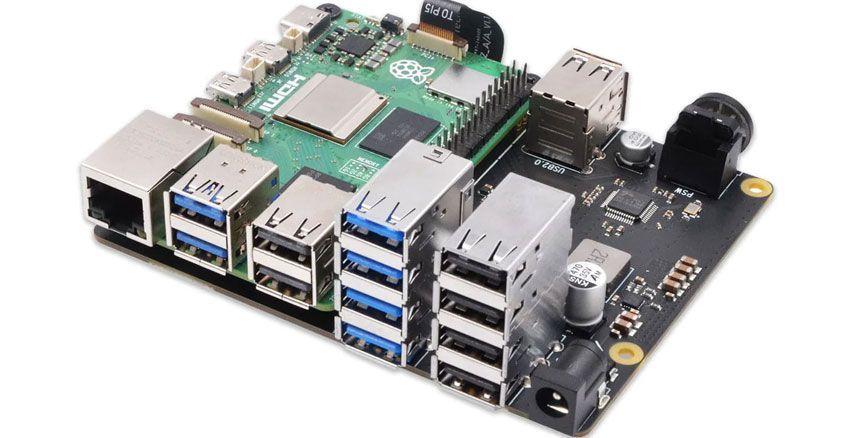
Nom de code X1013 : une extension 10 ports USB pour RPi
Avec un sens aigu du marketing, le X1013 se positionne comme un hub 10 ports pour cartes de développement Raspberry Pi..
https://www.minimachines.net/?p=138293 #geekworm #raspberrypi
As I age, I become increasingly cautious about my #privacy. The slope the world is sliding on is also a big, unfortunate incentive. I have been eying #PiHole for some time: in this post, I want to explain what it does, how to install it on a #RaspberryPi, and how to integrate it with #Tailscale.
Australian software engineer Sarah Spencer hacked a 1980's knitting machine to create "Stargazing: a knitted tapestry" to show the universe in a unique way. 🇦🇺
Sarah explains, “By using a floppy drive emulator written in Python and a web interface, I can send an image to the Raspberry Pi over the network, preview it in a knitting grid, and tell it to send the knitting pattern to the knitting machine via the floppy drive port ...
https://magazine.raspberrypi.com/articles/knitting-network-printer
🎥 Homelabbing - na co to komu? Jak serwować swoje usługi zamiast zdawać się na komercyjne chmury.
@stfn opowiada, jak uruchomić na własnym #RaspberryPi lub starym komputerze domowe centrum danych z wolnym oprogramowaniem, które zastąpi komercyjne, inwazyjne usługi — od prywatnego przechowywania zdjęć po własne repozytoria kodu.
👉 PeerTube: https://tube.pol.social/w/w6dxFqFrNeEbfftvpGejL2
👉 YouTube: https://youtu.be/Ml6vdiiIGu4
#piwo #piwo2025 #opensource #selfhosting

Assembling a Raspberry Pi Case Made Out of Paper
Print and assemble an inexpensive Raspberry Pi paper model case that is rigid enough to hold its form while still protecting the device.
https://www.adamsdesk.com/posts/assemble-raspberry-pi-paper-case/
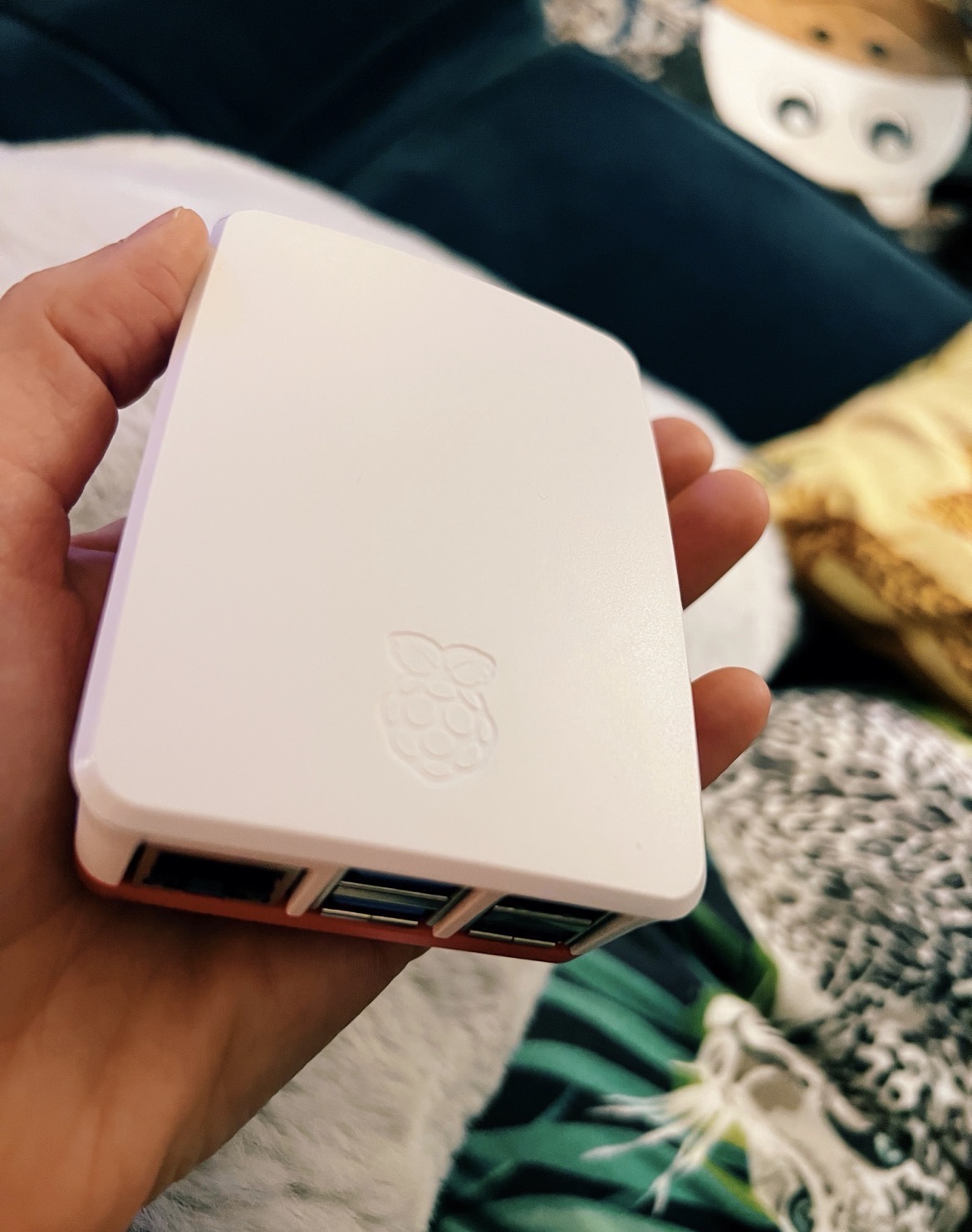
I was trying to show off my darling little Raspi to my extended family but nobody was impressed. So my #GratefulForYou nod today goes out to all my Fedi friends who enjoy and delight in this kind of stuff. And thank you for always teaching me new things 🥹
#Linux #SmallTech #RaspberryPi
Join @ishotjr and a panel of special guests as we take a deep dive into the hottest #embedded #development and tiny #computing #boards! From the #Arduino #UNOQ to the #RaspberryPi 500+ and everything in between, we analyze them all. Plus, connect off-grid with #Meshtastic, and knit a #plushie #breadboard that really works! Register now for our Thursday, November 6th V95 #LaunchParty! 🥳
https://makezine.com/article/maker-news/live-make-magazine-volume-95-launch-party/
Just shared a new guide! 📸🎥 Learn how to self-host Pixelfed and PeerTube on a Raspberry Pi 5 using an external hard drive and Cloudflare Tunnel for secure access. Own your photos and videos, your way.
@simontatham It's been a looong time since I used #putty (I ran it in a #Wine "bottle", these came from #flatpak, I'm using Debian 13 #KDE). Thanks for all your efforts!
To my mind, 98% of the time, people would use putty to log into a #linux box/VPS, like say a #RaspberryPi (Raspberry Pi OS, is #Debian Trixie 13-based). This would be a sensible default assumption, **demographically**.
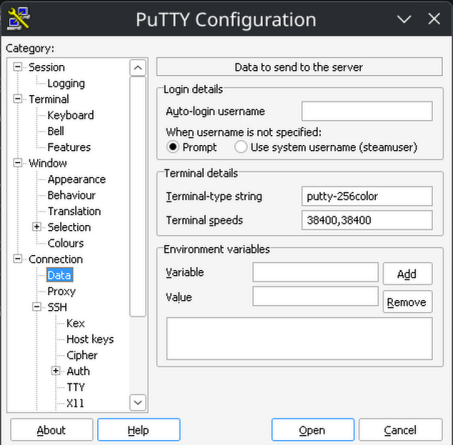
It took a good 2 hours of struggling, just to get 256 colors to work in Putty! (#Python's textualize library seriously expects 256, or *it can crash* when the Theme is changed). Please let the defaults be sane, so there's no struggle for 256 colors! Please alleviate my nerd rage - I beseech you!
1) Sane TERM env var:
Connection -> Data -> Terminal details -> Terminal-type string -> "putty-256color"
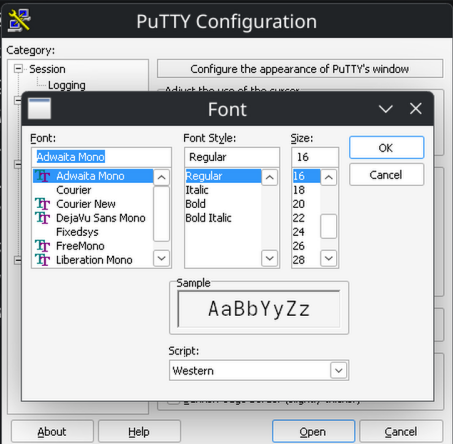
2) Sane default font:
Window -> Appearance -> Font settings -> "Change" button -> adwaita mono 12
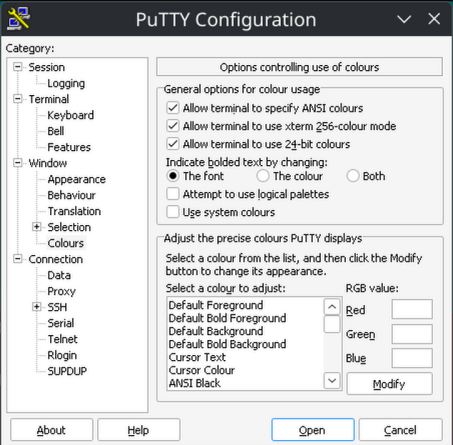
3) Sane bolding of text:
Window -> Colors -> General options for color usage -> Indicate bolded text by changing: The font
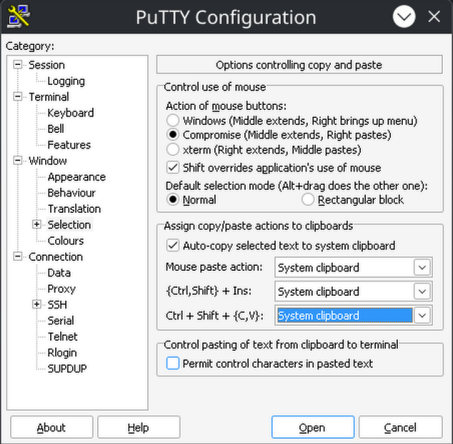
4) Sane (Linux-terminal-style) Ctrl + Shift + {C,V} (for copy and paste):
Window -> Selection -> Assign copy/paste actions to clipboard -> Ctrl + Shift + (C,V}: System Clipboard
Dear friends, we are happy to release the new version 2.0 of our Videomixer 😀!
With the bigger display it already looks a bit more "grown up" - and with features like video effects, projection mapping, playing videos on up to four different planes it surely is ☺️ .
Again, everything you need is available on our website vm-1.com.
We are really curious to hear your thoughts and comments. Let us know if you have any questions 🤗 !
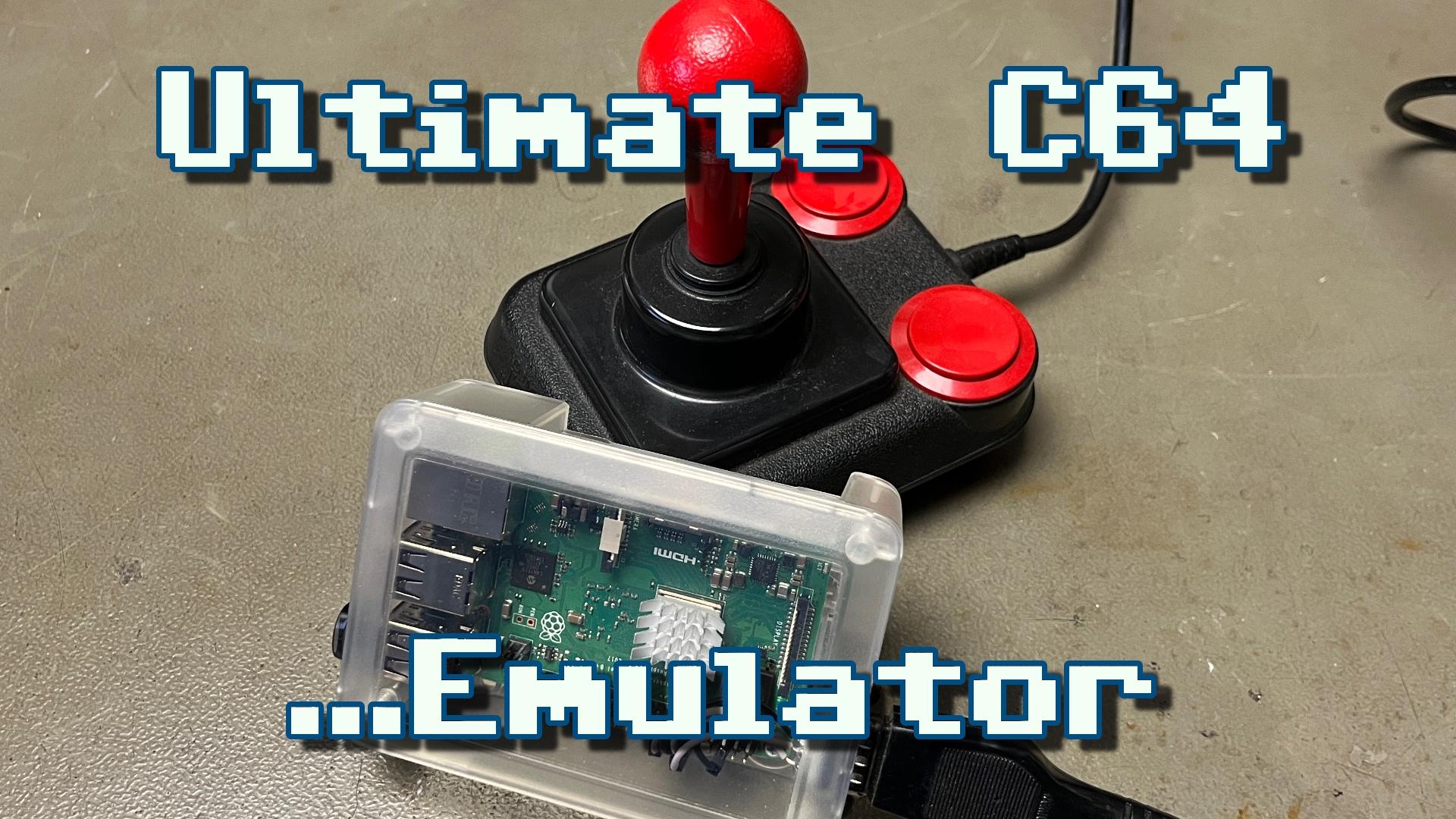
New video! Setting up a BMC64 emulator on a Raspberry Pi with a real joystick port and composite video output for my retro gaming corner.
YouTube: https://youtu.be/_AscFowI2pg
PeerTube: https://makertube.net/w/mKwdAeGj2maT6U2bYHejVu
#C64 #Commodore64 #Commodore #C64Ultimate #C64Mini #C64Maxi #Emulator #VICE #BMC64 #Joystick #Composite #CRT #RaspberryPi
Hi everyone! 👋 I know it's been a while since I was last here, but I had a very specific reason for it. I've spent the last few months with my small team intensely developing a project I mentioned to you once before. Every moment of my inactivity here was simply coding, designing the architecture, and endlessly solving problems 
Today, I am proud to announce - LibreConnect has moved past the phase of vague plans and become a fully functional app! 
We managed to deliver what was absolutely most important to us - an ecosystem connecting your 💻 computer and 📱 smartphone that respects your privacy 100%. Zero external clouds and hidden telemetry. Everything is based exclusively on a direct P2P connection within your local network and strong E2E encryption 🔐
So, what can our app actually do?
- Virtual camera and microphone from your phone 
- Mobile device file manager right from your PC 📁
- Notification and clipboard synchronization 📋
- Receiving and sending SMS/MMS from your computer 💬
- Two-way media playback control 🎵
- Remote keyboard and presentation control from your phone 
- Finding your phone by triggering a loud alarm (overriding silent mode) 🚨
- And a few other minor conveniences 
We also made sure the project is truly cross-platform. LibreConnect runs natively on  Linux,
  macOS,
  Windows, and
  Android. It's worth mentioning that the app isn't limited to just x86_64 architecture - we support ARM64 as well! To make updates easier, we've set up our own F-Droid repository, along with native packages for Linux package managers (APT, DNF, Pacman)

The code is 100% open-source under the GNU GPL v3.0 license  However, I have to be honest - the project is still very young. The app is highly usable, but it still requires optimization, might have some silly bugs, and can occasionally be unstable 🐛
That's why we need you so much right now. For the continued development of this app to make any sense, we need a small but engaged user base. I encourage you to install it, test it out, and report bugs, and for those interested - to join the project as contributors (you'll find a CONTRIBUTING.md in the repo) 🤝
If you like our vision, leaving a star ⭐ on our GitHub repository is the form of support we would appreciate the most. It's these stars that will allow us to take the project out into the world! Because of this, for the next few days, my activity here will focus mainly on promoting the app and its features - we need your help to build the right momentum. Thank you in advance for your support! 
You can find all other info here: https://libreconnect.one
#LibreConnect #Privacy #PrivacyByDesign #OpenSource #FOSS #Freedom #Software #FreeSoftware #Libre #BigTech #Tech #Technology #Dev #Programming #Code #App #Apps #CPlusPlus #Qt #Phone #PC #Computer #OS #OperatingSystem #Linux #RaspberryPi #Apple #Mac #Windows #Android #FDroid #Obtainium
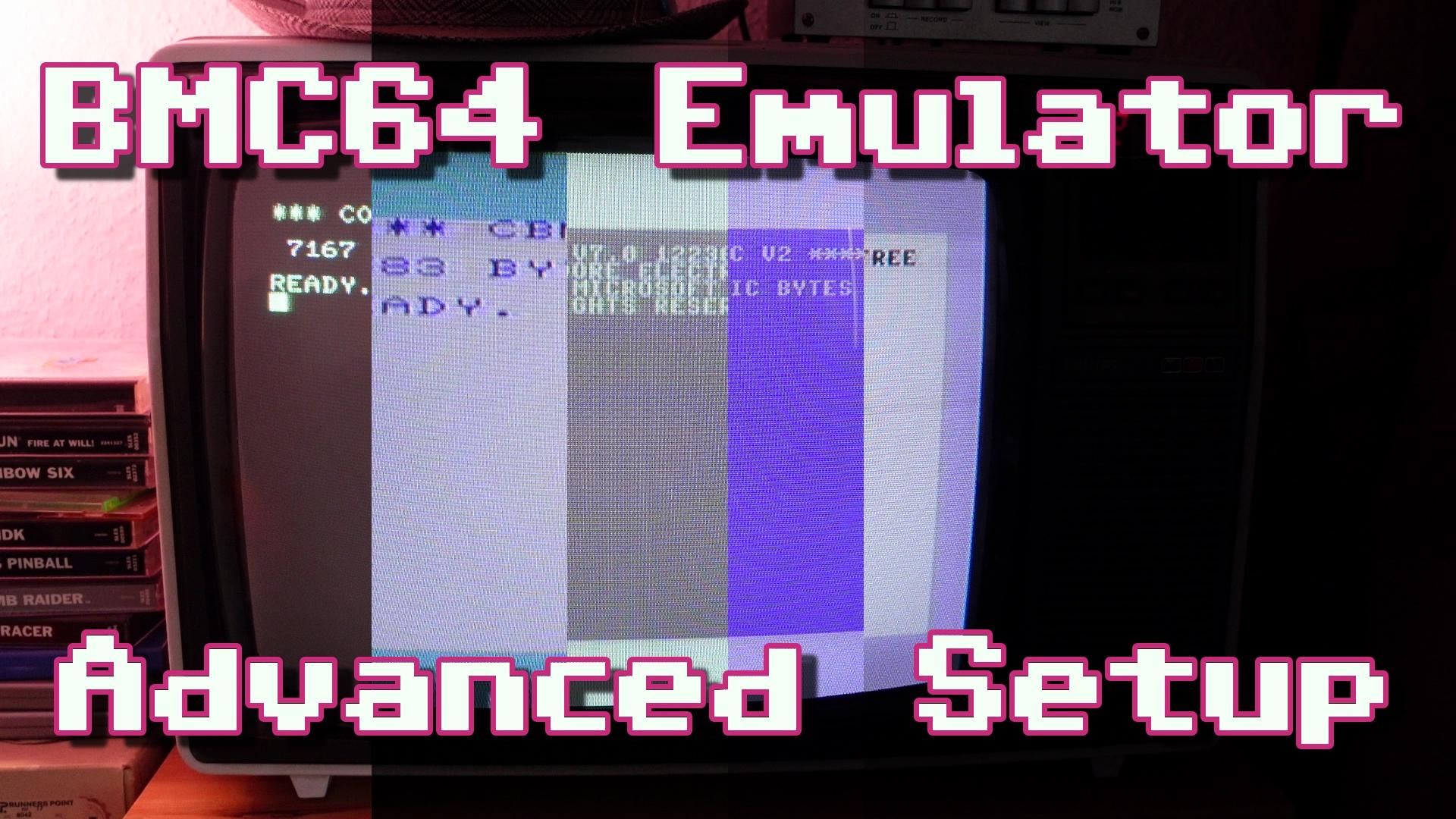
New video! Digging a bit deeper into the settings of the BMC64 emulator, installing all emulated systems and even getting autofire joysticks to work.
YouTube: https://youtu.be/m3RKBWSEvdU
PeerTube: https://makertube.net/w/tVY7GrYMV8DH1HAUbuHKXd
#C64 #Commodore64 #Commodore #C64Ultimate #C64Mini #C64Maxi #Emulator #VICE #BMC64 #Joystick #Composite #CRT #RaspberryPi
"If you want to be in the Fediverse without relying on big intances, or if you just want to own your #data & #identity on the network, running your own instance is the way to go.
That is where Mastodon alternatives such as GoToSocial & #snac comes in.
snac (Social Networks Are Crap) is a minimalistic, lightweight #ActivityPub instance…perfect for single user instances or small communities, and it's so light that even a #RaspberryPi can handle it without breaking a sweat."
https://rochacbruno.com/deploy-your-own-fediverse-instance-with-snac.html